 YACReader
- Posts: 10
- Thank you received: 0
Help and support for iPad, iPhone and iPod touch users.
Remote is not working
- IVN
- Topic Author
- Offline
- New Member
-

Less
More
7 years 3 months ago #4612
by IVN
Remote is not working was created by IVN
Ok... I just bought your app a few hours ago and the read remote isn't working! I already tried the qr code, changing the numbers on the port and even the manual ones( the one on the top of scan button) but its still sending me error!
My phone is Iphone 6
computer os is windows 10
My phone is Iphone 6
computer os is windows 10
Please Log in or Create an account to join the conversation.
- Luis Ángel
-

- Offline
- Administrator
-

Less
More
- Posts: 3354
- Thank you received: 692
7 years 3 months ago #4614
by Luis Ángel
Contribute to the project becoming a patron: www.patreon.com/yacreader
You can also donate via Pay-Pal: www.paypal.com/donate?business=5TAMNQCDD...e=Support+YACReader\
Replied by Luis Ángel on topic Remote is not working
Double check the firewall.
Contribute to the project becoming a patron: www.patreon.com/yacreader
You can also donate via Pay-Pal: www.paypal.com/donate?business=5TAMNQCDD...e=Support+YACReader\
Please Log in or Create an account to join the conversation.
- IVN
- Topic Author
- Offline
- New Member
-
Less
More
- Posts: 10
- Thank you received: 0
7 years 3 months ago #4615
by IVN
Replied by IVN on topic Remote is not working
I just allow it on my firewall just a couple of hours ago still not working... if im not mistaken there are 4 yacreader in my firewall and just check them all
Please Log in or Create an account to join the conversation.
- IVN
- Topic Author
- Offline
- New Member
-
Less
More
- Posts: 10
- Thank you received: 0
7 years 3 months ago #4616
by IVN
Replied by IVN on topic Remote is not working
by the way there is a chance that i missed something or what, can you post an instruction of how can I allow it on my firewall? just to take it a shot again I don't know if what I did is right or wrong...
Please Log in or Create an account to join the conversation.
- IVN
- Topic Author
- Offline
- New Member
-
Less
More
- Posts: 10
- Thank you received: 0
7 years 3 months ago #4617
by IVN
Replied by IVN on topic Remote is not working
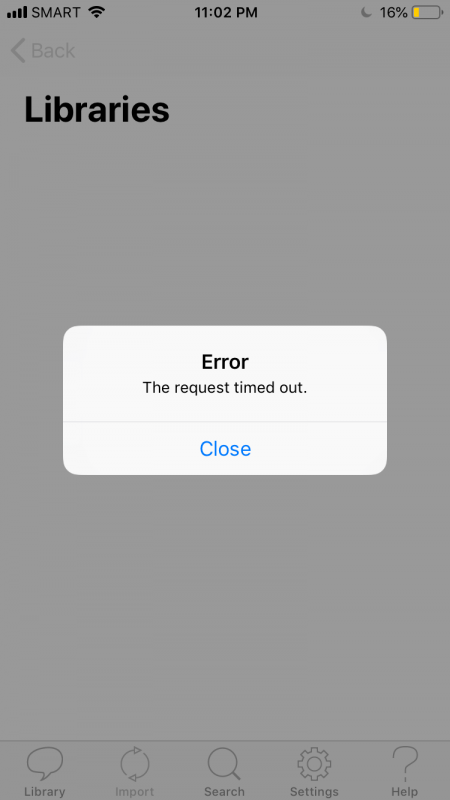
already check the firewall and all the box is checked still not working always giving me the error "request time out"! I think I've already tried all the options... Starting to give up right now 
Please Log in or Create an account to join the conversation.
- Luis Ángel
-
- Offline
- Administrator
-
Less
More
- Posts: 3354
- Thank you received: 692
7 years 3 months ago - 7 years 3 months ago #4618
by Luis Ángel
Contribute to the project becoming a patron: www.patreon.com/yacreader
You can also donate via Pay-Pal: www.paypal.com/donate?business=5TAMNQCDD...e=Support+YACReader\
Replied by Luis Ángel on topic Remote is not working
Post (or send it by email) a screenshot of the server config dialog in YACReaderLibrary and a screenshot of the connect view in the ios app, where you enter the ip and port. The error could be useful too.
The app you have to allow is YACReaderLibrary.exe
100% of this kind of issues (so far) are because: a) wrong ip/port is used or b) firewall
Are both devices connected to the same local network?
The app you have to allow is YACReaderLibrary.exe
100% of this kind of issues (so far) are because: a) wrong ip/port is used or b) firewall
Are both devices connected to the same local network?
Contribute to the project becoming a patron: www.patreon.com/yacreader
You can also donate via Pay-Pal: www.paypal.com/donate?business=5TAMNQCDD...e=Support+YACReader\
Last edit: 7 years 3 months ago by Luis Ángel.
Please Log in or Create an account to join the conversation.
- IVN
- Topic Author
- Offline
- New Member
-
Less
More
- Posts: 10
- Thank you received: 0
7 years 3 months ago #4619
by IVN
Replied by IVN on topic Remote is not working
Ok so I dont know where or what is the IP config in the yacreader library you are talking about but im pretty sure that it is the one in the middle of setting and question mark tab where you can find the QR code but anyways there is only 1 IP available on the tab. The IP written on my phone is the same on what is written on my library in pc as well as the port number and also YES, they are connected in the same router, I also double check the firewall and it is all check...
Please Log in or Create an account to join the conversation.
- IVN
- Topic Author
- Offline
- New Member
-
Less
More
- Posts: 10
- Thank you received: 0
7 years 3 months ago #4620
by IVN
Replied by IVN on topic Remote is not working
Here is the picture of the app on my phone when trying to connect on my pc
Please Log in or Create an account to join the conversation.
- Luis Ángel
-
- Offline
- Administrator
-
Less
More
- Posts: 3354
- Thank you received: 692
7 years 3 months ago #4621
by Luis Ángel
Contribute to the project becoming a patron: www.patreon.com/yacreader
You can also donate via Pay-Pal: www.paypal.com/donate?business=5TAMNQCDD...e=Support+YACReader\
Replied by Luis Ángel on topic Remote is not working
Open a web browser in your computer. Then type the ip and port you see in that dialog (yes, that is the dialog I am talking about) like this: http://192.168.1.110:8080
What do you see?
Then type this (replacing ip and port): http://192.168.1.116:8888/v2/libraries
What do you see?
Finally, do the same from your iOS device using a web browser. Do you see the same?
Btw, what version of iOS are you using?
What do you see?
Then type this (replacing ip and port): http://192.168.1.116:8888/v2/libraries
What do you see?
Finally, do the same from your iOS device using a web browser. Do you see the same?
Btw, what version of iOS are you using?
Contribute to the project becoming a patron: www.patreon.com/yacreader
You can also donate via Pay-Pal: www.paypal.com/donate?business=5TAMNQCDD...e=Support+YACReader\
Please Log in or Create an account to join the conversation.
- IVN
- Topic Author
- Offline
- New Member
-
Less
More
- Posts: 10
- Thank you received: 0
7 years 2 months ago #4624
by IVN
Replied by IVN on topic Remote is not working
Open a web browser in your computer. Then type the ip and port you see in that dialog (yes, that is the dialog I am talking about) like this: http://192.168.1.110:8080
answer: I can see my library and my comics
Then type this (replacing ip and port): http://192.168.1.116:8888/v2/libraries
answer: [{"id":1,"name":"Batman New52"}] I can see this which is the name of my library
but doing the same thing on my phone I don't see anything except this "safari could not open the page because the server stopped responding"
and also i'm using IOS 12.3.1
answer: I can see my library and my comics
Then type this (replacing ip and port): http://192.168.1.116:8888/v2/libraries
answer: [{"id":1,"name":"Batman New52"}] I can see this which is the name of my library
but doing the same thing on my phone I don't see anything except this "safari could not open the page because the server stopped responding"
and also i'm using IOS 12.3.1
Please Log in or Create an account to join the conversation.
Moderators: Luis Ángel