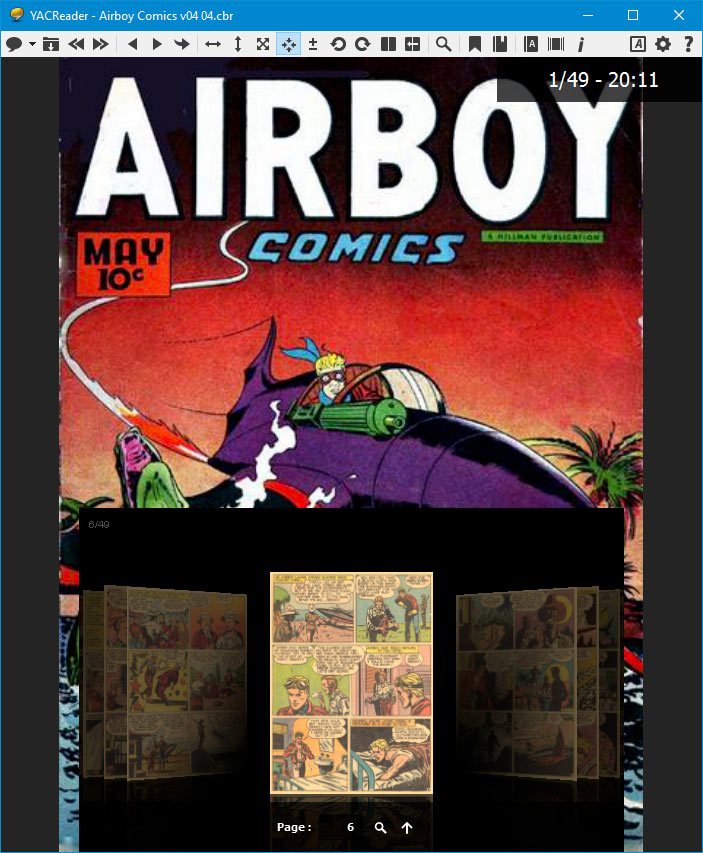
It has been a while without any new releases of YACReader, but there are good news, a new version is coming soon :).
Let's take a look to some of the new features:
The grid view has been enhanced with a new slider for choosing the size of the covers, and it also includes a fully configurable background that can use the covers of your comics, now every single folder will have a unique look.
New settings for grid view
YACReader UI has been refreshed with a cleaner look.
New UI for YACReader
New fit and zoom modes, finally!.
Fit to page and zoom modes
And last but not least, a headless version of the YACReaderLibrary's server (no gui). I have been testing it in a Raspberry Pi 2 with and external hard disk attached and it looks really stable, so it will be included in the next release.
YACReaderLibraryServer as a stand alone aplication
Good news everyone! The new versions of YACReader are ready! It has been a long wait but there are a lot of new features to discover.
YACReader 8.0 changelog:
Added Reading lists, including 'Favorites' and 'being read' lists
Tags, for whatever you want
New search engine, now you can filter folders and comics
New grid view
Add and delete folders
Update single folders (no need for updating the whole library to rescan a single folder)
Drag and drop for adding new comics and folders
Customizable shortcuts
Manga mode (thank you Felix)
Spread page detection for double page mode (including manga mode)(thank you again Felix :) )
New view for folders not containing comics (only subfolders)
Save selected covers to disk
Added WebP image format support
The user has to provide its own Comic Vine API key to prevent usage limit errors from Comic Vine
New unarr decompression backend for Linux and Unix systems
Fixed memory and files descriptors leaks in 7zip wrapper
YACReader 2.0 for iOS changelog:
Renewed UI, much more cleaner design
Improved image quality in covers(library) and pages(reading)
Added support for iPhone 6/6+
Completely new import section. Did you already tap the percentage indicator while importing?
Imports can be canceled, paused, resumed. They are automatically stored when the app goes to background and restored when it comes active again
Three new cloud services are supported, four in total: Dropbox, Google Drive, Box and One Drive
Support for browsing cloud services and selective import (configurable lading folder, no more YACReader folder)
Added full folders importing through iTunes (bye, bye to: create folder, select all, cut, paste)
YACReaderLibrary integration improved, the iOS version tries to connect automatically to the last server used. Added sync back reading progress to the server
Brosing, Importing, Reading from YACReaderLibrary is now supported using your data plan. You have to configure your router properly (port forwarding) and use your external IP to connect to the server. (beta, it is not 100% reliable)
PDF is supported natively, that means that you can use iTunes or cloud services for importing PDF files
Added support for WebP image format
Big covers view has been improved adding extra information (progress bar) and using all available space in portrait mode (showing more info: pages, issue number, volume and rating)
I have simplified the help section, I am going publish an online users' manual (it is not ready yet, but it will)
* App Store propagation to all the world wide servers could take some hours.
** backward compatibility in desktops/iOS integration is broken, so YACReader 8.0 and YACReader 2.0 for iOS have to work together.
Special thanks to Elia Gregorio for all her support and for understanding what this project means to me. I love you.
Felix(selmf), thank you very much for all your invaluable help!
I would like to thank all the users that have been involved in the development of these new versions: reporting bugs, sending me suggestions and doing all the beta testing work.
And the donor number 100 is....................Timothy O'Shea!
I would like to take this special occasion to thank all the donors for your support. It is really nice see how much some people enjoy YACReader and decide to help the project. Taking a look at the the wall of fame always motivates me to keep working on the project.
Finally, YACReader 7.2.0 and YACReader 1.6.0 for iOS are available*
New features in YACReader 1.6.0 for iOS:
Added remote reading from YACReaderLibrary without the need to import them first. Just browse your library from your desktop and read your comics on the fly.
New UI design for the remote library browser.
New UI design for folders and comics in the grid view. Now you can choose between three visual styles for your folders.
Bug fixes.
New features in YACReader 7.2.0:
Added support for the new "remote read" feature in iOS devices.
Improved stability
Fixed broken compatibility with Windows XP
Improved Linux "packageability" (thanks to Felix, Alexander and Yoann)**
German translation (thanks to Gerhard Joeken)
Bug fixes.
Thank you very much to all beta testers.
* App Store propagation to all the world wide servers could take some hours. ** deb package needs a little bit more work to be ready (coming soon).
 YACReader