 YACReader
- Posts: 5
- Thank you received: 0
Problem with poppler in Qt Creator
- boshuda
- Topic Author
- Offline
- New Member
-

Less
More
9 years 4 months ago #3122
by boshuda
Problem with poppler in Qt Creator was created by boshuda
I'm attempting to build using the MSVC2013 32bit 'kit' on QT 5.8 in Qt Creator on Windows 10, and I continue to receive "LINK : fatal error LNK1104: cannot open file '..\dependencies\poppler\lib\poppler-qt5.lib'". It does this with Qt 5.7 and with both Qts on MSVC2013 64bit. I've attempted to pull what I believe to be the tip from April 24, 2017 and I've had no luck with that or with the tip of the Develop branch. I also had zero luck with the Release build with Qt 5.8, MSVC2013 32bit.
Any pointers here would be great.
Any pointers here would be great.
Please Log in or Create an account to join the conversation.
- selmf
- Offline
- Moderator
-

Less
More
- Posts: 639
- Thank you received: 136
9 years 4 months ago - 9 years 4 months ago #3124
by selmf
My answers are not necessarily official YACReader statements but mostly represent my own opinion in technical matters.
Replied by selmf on topic Problem with poppler in Qt Creator
Hi boshuda,
you need to change the path to the precompiled poppler libraries in YACReader.pro and YACReaderLibrary.pro. These are located in the respective directories. Search for
"../dependencies/poppler/"
and change it like this;
"$$PWD/../dependencies/poppler/"
That should do the trick. Another problem you might encounter is the decompression backend. Afaik 7zip is still the default setting for the Windows build and it needs additional source code as well as a precompiled library which we do not ship with the source code.
We are aware that this situation is less than ideal and we are working to improve it. If you use the current develop branch my recommendation would be to do a build with pdfium as pdf rendering backend and unarr as a decompression backend. To do so, add the following arguments to qmake:
CONFIG+=pdfium
CONFIG+=unarr
Precompiled pdfium libraries for Windows are already included and the paths should work with QtCreator, but you will still have to add source code for the decompression backend. Read the documentation provided in compressed_archive/unarr/README.txt for details.
you need to change the path to the precompiled poppler libraries in YACReader.pro and YACReaderLibrary.pro. These are located in the respective directories. Search for
"../dependencies/poppler/"
and change it like this;
"$$PWD/../dependencies/poppler/"
That should do the trick. Another problem you might encounter is the decompression backend. Afaik 7zip is still the default setting for the Windows build and it needs additional source code as well as a precompiled library which we do not ship with the source code.
We are aware that this situation is less than ideal and we are working to improve it. If you use the current develop branch my recommendation would be to do a build with pdfium as pdf rendering backend and unarr as a decompression backend. To do so, add the following arguments to qmake:
CONFIG+=pdfium
CONFIG+=unarr
Precompiled pdfium libraries for Windows are already included and the paths should work with QtCreator, but you will still have to add source code for the decompression backend. Read the documentation provided in compressed_archive/unarr/README.txt for details.
My answers are not necessarily official YACReader statements but mostly represent my own opinion in technical matters.
Last edit: 9 years 4 months ago by selmf.
The following user(s) said Thank You: boshuda
Please Log in or Create an account to join the conversation.
- boshuda
- Topic Author
- Offline
- New Member
-
Less
More
- Posts: 5
- Thank you received: 0
9 years 4 months ago #3131
by boshuda
Replied by boshuda on topic Problem with poppler in Qt Creator
Okay, I got all of that working and created the binaries. I even fixed a bug! However, after forking the project on bitbucket, I really don't know how to make a pull request to pull my changes in to the main YacReader. I did a simple fix to try and figure out the workflow of making and committing changes to the source control. I'm really not familiar with Mercurial or BitBucket. I'm accustomed to SVN.
If someone could walk me through the general workflow of making a pull request that would be great. Or point me to some resources to better understand bitbucket. I'm not having too much luck with that, either.
If someone could walk me through the general workflow of making a pull request that would be great. Or point me to some resources to better understand bitbucket. I'm not having too much luck with that, either.
Please Log in or Create an account to join the conversation.
- selmf
- Offline
- Moderator
-
Less
More
- Posts: 639
- Thank you received: 136
9 years 4 months ago - 9 years 4 months ago #3132
by selmf
My answers are not necessarily official YACReader statements but mostly represent my own opinion in technical matters.
Replied by selmf on topic Problem with poppler in Qt Creator
1. Log into your repository on Bitbucket.
2. Click "Pull requests"
3. Click "Create pull request"
4. Fill in the Form. Make sure the destination branch for Luis' repo is "develop", not default
5. Create the pull request
6. Nag Luis till he reviews and merges the pull request
2. Click "Pull requests"
3. Click "Create pull request"
4. Fill in the Form. Make sure the destination branch for Luis' repo is "develop", not default
5. Create the pull request
6. Nag Luis till he reviews and merges the pull request
My answers are not necessarily official YACReader statements but mostly represent my own opinion in technical matters.
Last edit: 9 years 4 months ago by selmf.
The following user(s) said Thank You: boshuda
Please Log in or Create an account to join the conversation.
- boshuda
- Topic Author
- Offline
- New Member
-
Less
More
- Posts: 5
- Thank you received: 0
9 years 4 months ago #3135
by boshuda
Replied by boshuda on topic Problem with poppler in Qt Creator
I'll leave Luis alone  . But thanks for the flow.
When I try to select Luis' repo, I don't have that option in the dropdown. Do I need to be on his list of approved contributors or something?
. But thanks for the flow.When I try to select Luis' repo, I don't have that option in the dropdown. Do I need to be on his list of approved contributors or something?
Please Log in or Create an account to join the conversation.
- selmf
- Offline
- Moderator
-
Less
More
- Posts: 639
- Thank you received: 136
9 years 4 months ago #3136
by selmf
My answers are not necessarily official YACReader statements but mostly represent my own opinion in technical matters.
Replied by selmf on topic Problem with poppler in Qt Creator
No, it just should show up. Maybe you're looking in the wrong pulldown? The branch is selected in the pulldown menu under the destination repo.
My answers are not necessarily official YACReader statements but mostly represent my own opinion in technical matters.
Please Log in or Create an account to join the conversation.
- Luis Ángel
-

- Offline
- Administrator
-

Less
More
- Posts: 3354
- Thank you received: 692
9 years 4 months ago #3137
by Luis Ángel
Contribute to the project becoming a patron: www.patreon.com/yacreader
You can also donate via Pay-Pal: www.paypal.com/donate?business=5TAMNQCDD...e=Support+YACReader\
Replied by Luis Ángel on topic Problem with poppler in Qt Creator
PR for that bug fix please! 
Nice to see a developer around.
Do not hesitate to ask for help if you need anything.
Nice to see a developer around.
Do not hesitate to ask for help if you need anything.
Contribute to the project becoming a patron: www.patreon.com/yacreader
You can also donate via Pay-Pal: www.paypal.com/donate?business=5TAMNQCDD...e=Support+YACReader\
Please Log in or Create an account to join the conversation.
- boshuda
- Topic Author
- Offline
- New Member
-
Less
More
- Posts: 5
- Thank you received: 0
9 years 4 months ago #3141
by boshuda
I know that my account was a bit wonky. It's kind of tied to my G+ account, but that didn't seem to work very well. I feel like I also had to create an account using the email address. So maybe there's something there. My commit is also stuck at 'draft'. I've attempted to push it to Public, and that seems to work via the HG commands in the terminal, but the website still indicates it's in draft.
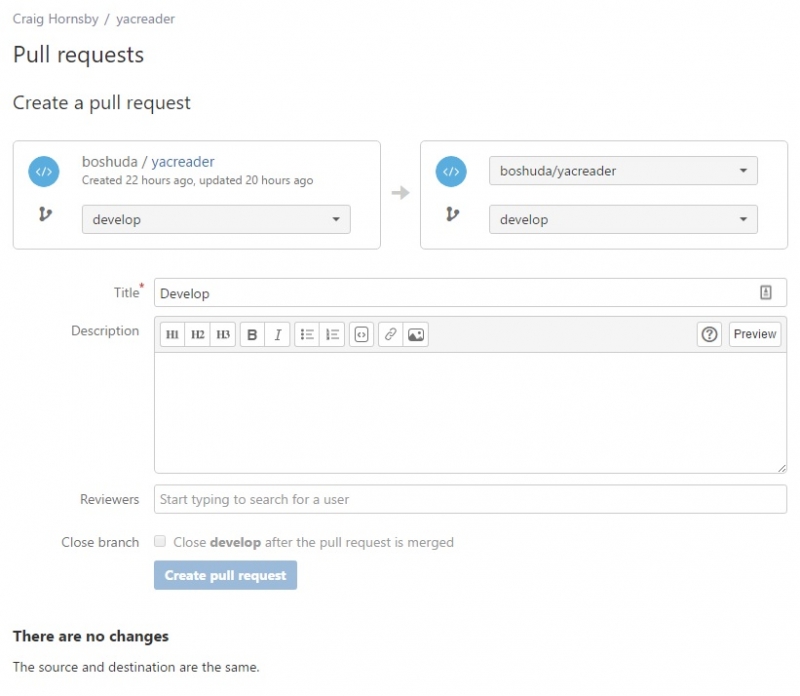
Replied by boshuda on topic Problem with poppler in Qt Creator
I go to my forked repo, then to the Pull Requests. In the upper right is the Create Pull Request link. When I follow that, I try to select a different repo on the destination side, but the only repo I seem to have access to is my own.selmf wrote: No, it just should show up. Maybe you're looking in the wrong pulldown? The branch is selected in the pulldown menu under the destination repo.
I know that my account was a bit wonky. It's kind of tied to my G+ account, but that didn't seem to work very well. I feel like I also had to create an account using the email address. So maybe there's something there. My commit is also stuck at 'draft'. I've attempted to push it to Public, and that seems to work via the HG commands in the terminal, but the website still indicates it's in draft.
Please Log in or Create an account to join the conversation.
- selmf
- Offline
- Moderator
-
Less
More
- Posts: 639
- Thank you received: 136
9 years 4 months ago - 9 years 4 months ago #3144
by selmf
My answers are not necessarily official YACReader statements but mostly represent my own opinion in technical matters.
Replied by selmf on topic Problem with poppler in Qt Creator
This is how it looks for me:
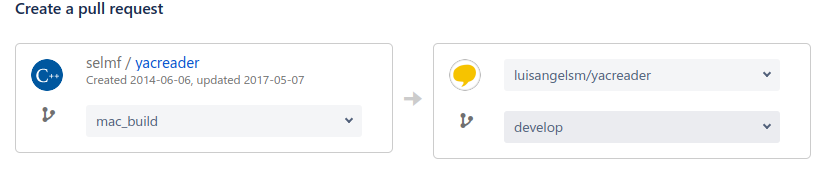
On the right side I can choose between Luis' repository and mine in the upper pulldown and the branch in the lower one. If that's not available for you it's probably a bug in Bitbucket's new UI.
On the right side I can choose between Luis' repository and mine in the upper pulldown and the branch in the lower one. If that's not available for you it's probably a bug in Bitbucket's new UI.
My answers are not necessarily official YACReader statements but mostly represent my own opinion in technical matters.
Last edit: 9 years 4 months ago by selmf.
The following user(s) said Thank You: boshuda
Please Log in or Create an account to join the conversation.
- boshuda
- Topic Author
- Offline
- New Member
-
Less
More
- Posts: 5
- Thank you received: 0
9 years 4 months ago #3150
by boshuda
Replied by boshuda on topic Problem with poppler in Qt Creator
I still can't get it to complete a pull request to Luis' repo. So I created a ticket with BitBucket. The only thing I didn't try (that I could think of/locate on the web) was to completely wipe out my repo and refork it or create a new account to fork to. That seemed a bit much for what seems like a minimum bit of functionality.
Please Log in or Create an account to join the conversation.
Moderators: Luis Ángel