 YACReader
- Posts: 5
- Thank you received: 0
Help and support for iPad, iPhone and iPod touch users.
Yacreader iOS cannot connect to my MacBook library
- Schlave
- Topic Author
- Offline
- New Member
-

Less
More
5 years 8 months ago #5695
by Schlave
Yacreader iOS cannot connect to my MacBook library was created by Schlave
Hi I am on 9.8.0 beta of yacreader desktop but am unable to get the yacreader iOS app to connect to my MacBook library. It always says request times out.
I'm using an M1 MacBook Air.
The library can be viewed on safari on the MacBook but not on the iPhone (updated to latest os 14.4)
I've checked that firewall is not enabled on my MacBook.
I've got adguard adblocker installed on my phone but no success even after uninstalling.
Any help?
I'm using an M1 MacBook Air.
The library can be viewed on safari on the MacBook but not on the iPhone (updated to latest os 14.4)
I've checked that firewall is not enabled on my MacBook.
I've got adguard adblocker installed on my phone but no success even after uninstalling.
Any help?
Please Log in or Create an account to join the conversation.
- Luis Ángel
-

- Offline
- Administrator
-

Less
More
- Posts: 3354
- Thank you received: 692
5 years 8 months ago #5697
by Luis Ángel
Contribute to the project becoming a patron: www.patreon.com/yacreader
You can also donate via Pay-Pal: www.paypal.com/donate?business=5TAMNQCDD...e=Support+YACReader\
Replied by Luis Ángel on topic Yacreader iOS cannot connect to my MacBook library
Double check the ip and port. In the iOS app delete the current connection data and scan the QR again.
My guess is that the port changed for some reason.
My guess is that the port changed for some reason.
Contribute to the project becoming a patron: www.patreon.com/yacreader
You can also donate via Pay-Pal: www.paypal.com/donate?business=5TAMNQCDD...e=Support+YACReader\
Please Log in or Create an account to join the conversation.
- Schlave
- Topic Author
- Offline
- New Member
-
Less
More
- Posts: 5
- Thank you received: 0
5 years 8 months ago #5699
by Schlave
Replied by Schlave on topic Yacreader iOS cannot connect to my MacBook library
No luck - the ip and port match. still cannot to connect iOS to yacreader app on macOS.
Please help! I'm already liking the new features in manga for the beta version and look forward to having a synced collection btw my macOS and iPhone
Please help! I'm already liking the new features in manga for the beta version and look forward to having a synced collection btw my macOS and iPhone
Please Log in or Create an account to join the conversation.
- Luis Ángel
-
- Offline
- Administrator
-
Less
More
- Posts: 3354
- Thank you received: 692
5 years 8 months ago #5700
by Luis Ángel
Contribute to the project becoming a patron: www.patreon.com/yacreader
You can also donate via Pay-Pal: www.paypal.com/donate?business=5TAMNQCDD...e=Support+YACReader\
Replied by Luis Ángel on topic Yacreader iOS cannot connect to my MacBook library
hmm, it is working just fine for me...
So was it working fine before installing 9.8.0?
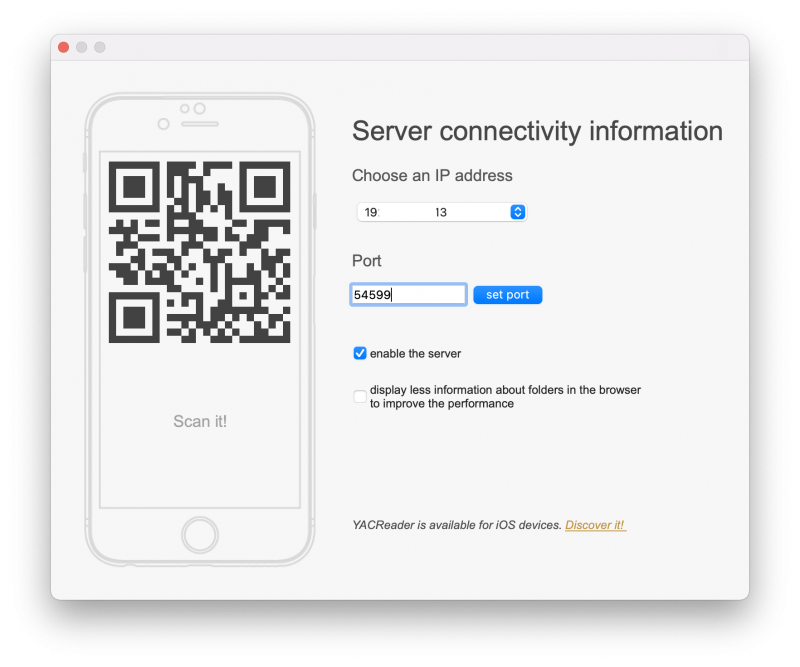
Can I see a screenshot of the server config dialog from YACReaderLibrary?
So was it working fine before installing 9.8.0?
Can I see a screenshot of the server config dialog from YACReaderLibrary?
Contribute to the project becoming a patron: www.patreon.com/yacreader
You can also donate via Pay-Pal: www.paypal.com/donate?business=5TAMNQCDD...e=Support+YACReader\
Please Log in or Create an account to join the conversation.
- Schlave
- Topic Author
- Offline
- New Member
-
Less
More
- Posts: 5
- Thank you received: 0
5 years 8 months ago #5704
by Schlave
Replied by Schlave on topic Yacreader iOS cannot connect to my MacBook library
Actually it wasn't working at all.. even in the public release 9.7.1
By server config dialog, do you mean a screenshot of the window that pops up to configure the port called "server connectivity information"?
By server config dialog, do you mean a screenshot of the window that pops up to configure the port called "server connectivity information"?
Please Log in or Create an account to join the conversation.
- Luis Ángel
-
- Offline
- Administrator
-
Less
More
- Posts: 3354
- Thank you received: 692
5 years 8 months ago #5707
by Luis Ángel
Exactly.
The fact that you can't see any responses from the server even if you use a web browser from your iOS devices indicates some sort of network problem.
Are you able to communicate both devices over your network using any other apps/servers?
Contribute to the project becoming a patron: www.patreon.com/yacreader
You can also donate via Pay-Pal: www.paypal.com/donate?business=5TAMNQCDD...e=Support+YACReader\
Replied by Luis Ángel on topic Yacreader iOS cannot connect to my MacBook library
Schlave wrote: By server config dialog, do you mean a screenshot of the window that pops up to configure the port called "server connectivity information"?
Exactly.
The fact that you can't see any responses from the server even if you use a web browser from your iOS devices indicates some sort of network problem.
Are you able to communicate both devices over your network using any other apps/servers?
Contribute to the project becoming a patron: www.patreon.com/yacreader
You can also donate via Pay-Pal: www.paypal.com/donate?business=5TAMNQCDD...e=Support+YACReader\
Please Log in or Create an account to join the conversation.
- Schlave
- Topic Author
- Offline
- New Member
-
Less
More
- Posts: 5
- Thank you received: 0
5 years 8 months ago #5709
by Schlave
Replied by Schlave on topic Yacreader iOS cannot connect to my MacBook library
Thank you Luis for your prompt replies
I have to check later if the same problem occurs in different apps.
I have to check later if the same problem occurs in different apps.
Please Log in or Create an account to join the conversation.
- Luis Ángel
-
- Offline
- Administrator
-
Less
More
- Posts: 3354
- Thank you received: 692
5 years 8 months ago #5710
by Luis Ángel
Contribute to the project becoming a patron: www.patreon.com/yacreader
You can also donate via Pay-Pal: www.paypal.com/donate?business=5TAMNQCDD...e=Support+YACReader\
Replied by Luis Ángel on topic Yacreader iOS cannot connect to my MacBook library
Did you tried using a different port number? like 8080 or 8888?
Contribute to the project becoming a patron: www.patreon.com/yacreader
You can also donate via Pay-Pal: www.paypal.com/donate?business=5TAMNQCDD...e=Support+YACReader\
The following user(s) said Thank You: Schlave
Please Log in or Create an account to join the conversation.
- Schlave
- Topic Author
- Offline
- New Member
-
Less
More
- Posts: 5
- Thank you received: 0
5 years 8 months ago #5711
by Schlave
Replied by Schlave on topic Yacreader iOS cannot connect to my MacBook library
Hi Luis.
What you said about there being a network problem may have been correct. I cannot tell where exactly the problem lay, but I began troubleshooting when I had problems with airdrop between my Mac and iPhone.
Some trial and error later (reset of bluetooth and wifi router), I tried again and this time the connection to Yacreaderlibrary succeeded.
I hope that this continues , but for the time being I am a happy user of Yacreader on Mac and iOS!
I am however a little concerned about potential exposure of my library to hackers though? Is it not visible to whoever knows my ip and port no?
What you said about there being a network problem may have been correct. I cannot tell where exactly the problem lay, but I began troubleshooting when I had problems with airdrop between my Mac and iPhone.
Some trial and error later (reset of bluetooth and wifi router), I tried again and this time the connection to Yacreaderlibrary succeeded.
I hope that this continues , but for the time being I am a happy user of Yacreader on Mac and iOS!
I am however a little concerned about potential exposure of my library to hackers though? Is it not visible to whoever knows my ip and port no?
Please Log in or Create an account to join the conversation.
- Luis Ángel
-
- Offline
- Administrator
-
Less
More
- Posts: 3354
- Thank you received: 692
5 years 8 months ago #5712
by Luis Ángel
Contribute to the project becoming a patron: www.patreon.com/yacreader
You can also donate via Pay-Pal: www.paypal.com/donate?business=5TAMNQCDD...e=Support+YACReader\
Replied by Luis Ángel on topic Yacreader iOS cannot connect to my MacBook library
Great!
The server is only visible in you local network, so it is totally safe.
The server is only visible in you local network, so it is totally safe.
Contribute to the project becoming a patron: www.patreon.com/yacreader
You can also donate via Pay-Pal: www.paypal.com/donate?business=5TAMNQCDD...e=Support+YACReader\
Please Log in or Create an account to join the conversation.
Moderators: Luis Ángel