 YACReader
- Posts: 1
- Thank you received: 0
Help and support for iPad, iPhone and iPod touch users.
Importing to iOS questions
- tayseratops
- Topic Author
- Offline
- New Member
-

Less
More
11 years 2 months ago #1671
by tayseratops
Importing to iOS questions was created by tayseratops
Hi! I'm new here.
I just wanna know if there's a way to cancel import via wifi once it started?
See, I accidentally clicked on import on my iPad and the whole process started going on.
But I don't wanna import this one whole folder, just a specific comic.
The problem is though, even if I tried disconnecting my wifi or tried closing the app, it seems that the importing process was just paused and everytime I connect my Macbook to my iPad through wifi, it starts to go on again.
How do I cancel this process? Thank you.
I just wanna know if there's a way to cancel import via wifi once it started?
See, I accidentally clicked on import on my iPad and the whole process started going on.
But I don't wanna import this one whole folder, just a specific comic.
The problem is though, even if I tried disconnecting my wifi or tried closing the app, it seems that the importing process was just paused and everytime I connect my Macbook to my iPad through wifi, it starts to go on again.
How do I cancel this process? Thank you.
Please Log in or Create an account to join the conversation.
- Luis Ángel
-

- Offline
- Administrator
-

Less
More
- Posts: 3354
- Thank you received: 692
11 years 2 months ago - 11 years 2 months ago #1676
by Luis Ángel
Contribute to the project becoming a patron: www.patreon.com/yacreader
You can also donate via Pay-Pal: www.paypal.com/donate?business=5TAMNQCDD...e=Support+YACReader\
Replied by Luis Ángel on topic Importing to iOS questions
Welcome to the forum!
You have to go back to the import screen, and then tap the percentage indicator. You will see an importing queue, just tap the 'x' on each cell for individual cancelling or tap the 'x' in the bottom part for cancel everything.
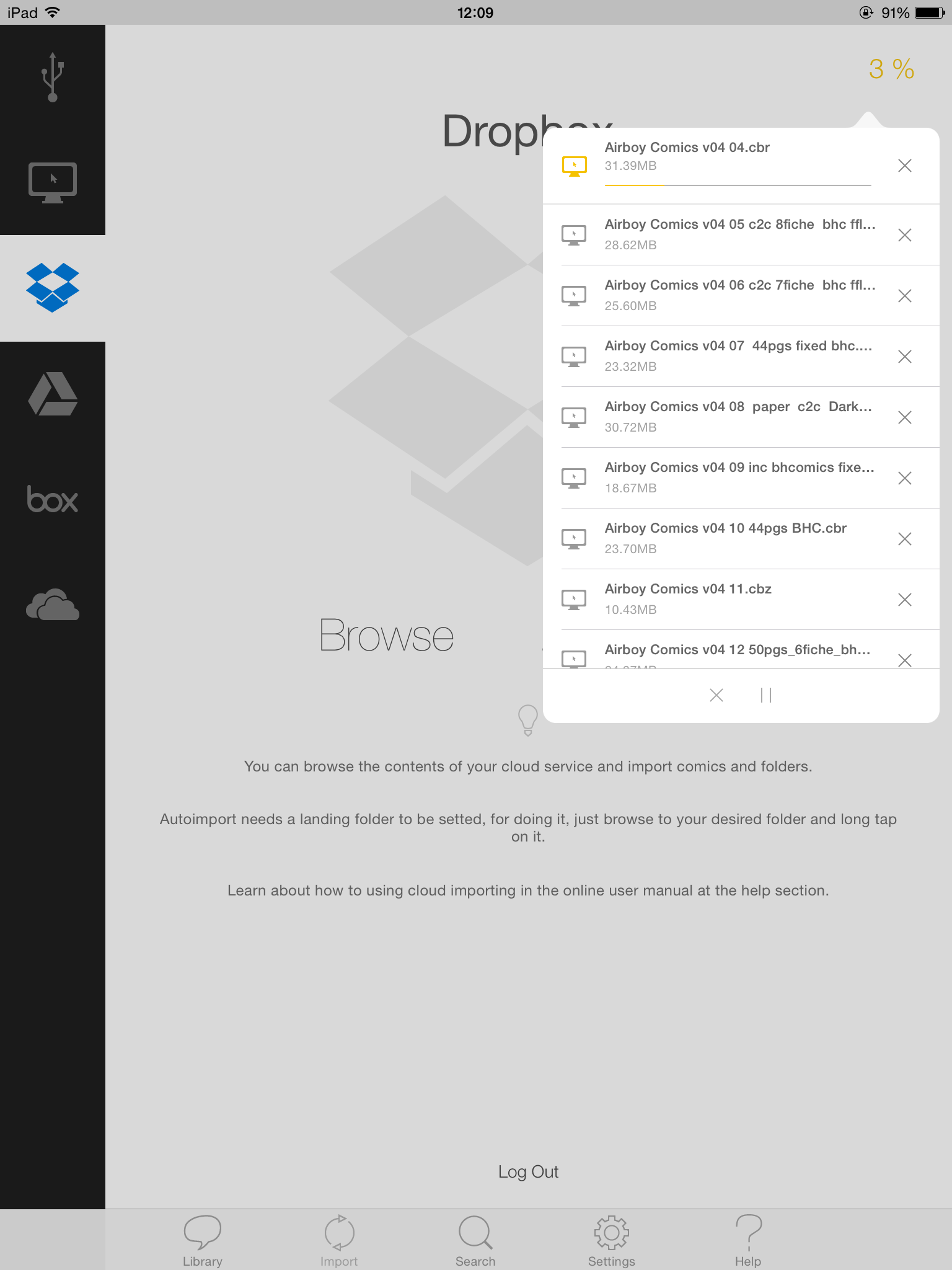
You have to go back to the import screen, and then tap the percentage indicator. You will see an importing queue, just tap the 'x' on each cell for individual cancelling or tap the 'x' in the bottom part for cancel everything.
Contribute to the project becoming a patron: www.patreon.com/yacreader
You can also donate via Pay-Pal: www.paypal.com/donate?business=5TAMNQCDD...e=Support+YACReader\
Last edit: 11 years 2 months ago by Luis Ángel.
Please Log in or Create an account to join the conversation.
Moderators: Luis Ángel