 YACReader
- Posts: 24
- Thank you received: 2
Help and support for MacOSX users.
Wi-Fi Import No Longer Working
- phunetik
- Topic Author
- Offline
- Junior Member
-

Less
More
12 years 1 month ago #706
by phunetik
Wi-Fi Import No Longer Working was created by phunetik
So... pretty much what the title says. All was right in the world, and then suddenly I can't import via wi-fi. I went to scan the little black and white IR square thing, and it says it can't find the server. I uploaded via iTunes (and dropbox), but the wi-fi was fast and my preferred method. Any ideas? Clues? Help?
Please Log in or Create an account to join the conversation.
- Luis Ángel
-

- Offline
- Administrator
-

Less
More
- Posts: 3354
- Thank you received: 692
12 years 1 month ago - 12 years 1 month ago #709
by Luis Ángel
Contribute to the project becoming a patron: www.patreon.com/yacreader
You can also donate via Pay-Pal: www.paypal.com/donate?business=5TAMNQCDD...e=Support+YACReader\
Replied by Luis Ángel on topic Wi-Fi Import No Longer Working
Try to open a web browser in your computer and type yourIP:port in the address bar. Let me know if you can browse your library from there.
Verify that the check: "enable the server" is actually checked.
In the server configuration dialog, you should check if you have more than one ip address (open the combo box). If so, you can try with the other ips.
Let me know if you can fix the issue.
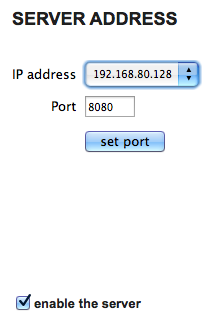
Verify that the check: "enable the server" is actually checked.
In the server configuration dialog, you should check if you have more than one ip address (open the combo box). If so, you can try with the other ips.
Let me know if you can fix the issue.
Contribute to the project becoming a patron: www.patreon.com/yacreader
You can also donate via Pay-Pal: www.paypal.com/donate?business=5TAMNQCDD...e=Support+YACReader\
Last edit: 12 years 1 month ago by Luis Ángel.
Please Log in or Create an account to join the conversation.
- phunetik
- Topic Author
- Offline
- Junior Member
-
Less
More
- Posts: 24
- Thank you received: 2
12 years 3 weeks ago #737
by phunetik
Replied by phunetik on topic Wi-Fi Import No Longer Working
Im going to sound stupid... but what all should I be typing in the browser bar?
Just:
8080
or:
ip address plus port?
Im not a computer genius, so I am curious.
Just:
8080
or:
ip address plus port?
Im not a computer genius, so I am curious.
Please Log in or Create an account to join the conversation.
- Luis Ángel
-
- Offline
- Administrator
-
Less
More
- Posts: 3354
- Thank you received: 692
12 years 3 weeks ago #739
by Luis Ángel
Contribute to the project becoming a patron: www.patreon.com/yacreader
You can also donate via Pay-Pal: www.paypal.com/donate?business=5TAMNQCDD...e=Support+YACReader\
Replied by Luis Ángel on topic Wi-Fi Import No Longer Working
You have to write the ip and the port this way -> ip:port. f.e: 192.168.2.100:8888
Contribute to the project becoming a patron: www.patreon.com/yacreader
You can also donate via Pay-Pal: www.paypal.com/donate?business=5TAMNQCDD...e=Support+YACReader\
Please Log in or Create an account to join the conversation.
- phunetik
- Topic Author
- Offline
- Junior Member
-
Less
More
- Posts: 24
- Thank you received: 2
11 years 10 months ago #867
by phunetik
Replied by phunetik on topic Wi-Fi Import No Longer Working
apologies for delay... been super busy... this worked! Thank you!
Please Log in or Create an account to join the conversation.
- Luis Ángel
-
- Offline
- Administrator
-
Less
More
- Posts: 3354
- Thank you received: 692
11 years 10 months ago #872
by Luis Ángel
Contribute to the project becoming a patron: www.patreon.com/yacreader
You can also donate via Pay-Pal: www.paypal.com/donate?business=5TAMNQCDD...e=Support+YACReader\
Replied by Luis Ángel on topic Wi-Fi Import No Longer Working
Great! 
Contribute to the project becoming a patron: www.patreon.com/yacreader
You can also donate via Pay-Pal: www.paypal.com/donate?business=5TAMNQCDD...e=Support+YACReader\
Please Log in or Create an account to join the conversation.
Moderators: Luis Ángel