 YACReader
- Posts: 2
- Thank you received: 0
Help and support for Windows users.
Question about tags & searching [crit/suggestion]
- althekoolkid
- Topic Author
- Offline
- New Member
-

Less
More
7 years 8 months ago #4444
by althekoolkid
Question about tags & searching [crit/suggestion] was created by althekoolkid
I am a new user and I could be missing something, so if I am someone please let me know, but here is what I have been trying and a conclusion that I have come to. . .
So on the iOS app what is the purpose of the search function (other than title? I tried to use it to circumvent the (what I feel to be) very clunky tagging (label) system (in the library app) and everything I have tried has failed to yield a search result.
Just for some background, I primarily use the app for Manga so the ComicVine tags are not really an option for me, however a site I use has a fairly extensive tagging system that is %100 text base. It doesn't use any crazy scripts or XML files or anything like that. . .Its simply a list of tags in text format separated by commas.
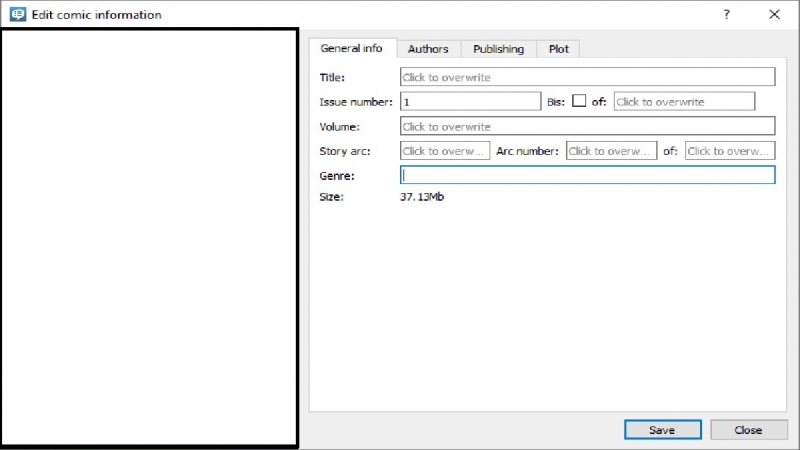
It seams like it would be fairly simple just to add a "tags" section under the "edit comic information" screen under where it says "Genre" to add a section for keyword/tags to be added and then allow those keywords/tags to be imported to the iOS app and be searchable under the search field.
I have tried adding the tags by copying and pasting the keywords to various sections of the "edit comic info." tab like the "genre", "notes" and "synopsis" sections, but none of those field appear to be searchable. Is there somewhere that I can paste tags (in the meantime) where they will be searchable in the iOS app after importing them?
So on the iOS app what is the purpose of the search function (other than title? I tried to use it to circumvent the (what I feel to be) very clunky tagging (label) system (in the library app) and everything I have tried has failed to yield a search result.
Just for some background, I primarily use the app for Manga so the ComicVine tags are not really an option for me, however a site I use has a fairly extensive tagging system that is %100 text base. It doesn't use any crazy scripts or XML files or anything like that. . .Its simply a list of tags in text format separated by commas.
It seams like it would be fairly simple just to add a "tags" section under the "edit comic information" screen under where it says "Genre" to add a section for keyword/tags to be added and then allow those keywords/tags to be imported to the iOS app and be searchable under the search field.
I have tried adding the tags by copying and pasting the keywords to various sections of the "edit comic info." tab like the "genre", "notes" and "synopsis" sections, but none of those field appear to be searchable. Is there somewhere that I can paste tags (in the meantime) where they will be searchable in the iOS app after importing them?
Please Log in or Create an account to join the conversation.
- Luis Ángel
-

- Offline
- Administrator
-

Less
More
- Posts: 3354
- Thank you received: 692
7 years 8 months ago #4445
by Luis Ángel
Contribute to the project becoming a patron: www.patreon.com/yacreader
You can also donate via Pay-Pal: www.paypal.com/donate?business=5TAMNQCDD...e=Support+YACReader\
Replied by Luis Ángel on topic Question about tags & searching [crit/suggestion]
The search function in iOS filters only by name. I don't think that searching makes much sense in the iOS app.
What is your use case, how would you use the search funtion in iOS?
What is your use case, how would you use the search funtion in iOS?
Contribute to the project becoming a patron: www.patreon.com/yacreader
You can also donate via Pay-Pal: www.paypal.com/donate?business=5TAMNQCDD...e=Support+YACReader\
Please Log in or Create an account to join the conversation.
- althekoolkid
- Topic Author
- Offline
- New Member
-
Less
More
- Posts: 2
- Thank you received: 0
7 years 8 months ago #4446
by althekoolkid
Replied by althekoolkid on topic Question about tags & searching [crit/suggestion]
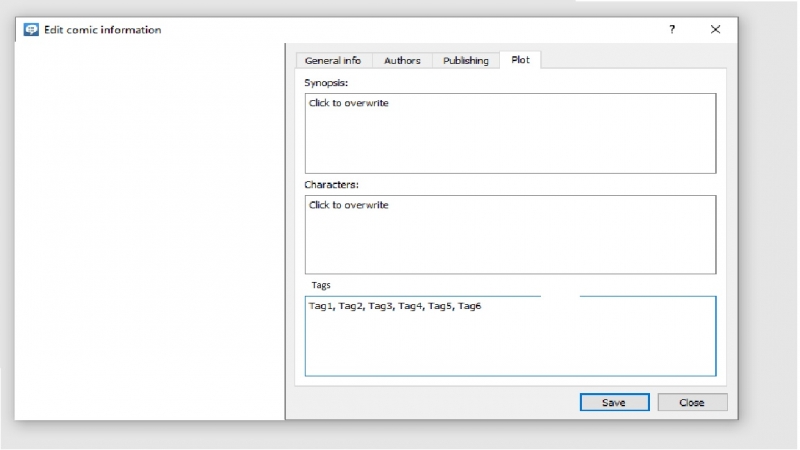
I have A BUNCH of comics imported, if there was an option to add text based tags I could filter them at my own discretion (see image for example).
If I wanted to see only comics with "tag2", all I would have to do is search Tag2 and it would filter them. The tags could be themes, elements, scenes-types, characters, anything like that and if the search could filter them it would be much more utilitarian.
For instance if I wanted to read a "noir" style comic. I could tag all my comics in the Library accordingly and search for "Noir" in the iOS app and it would only show those comics (even if I don't know the exact name).
If I wanted to see only comics with "tag2", all I would have to do is search Tag2 and it would filter them. The tags could be themes, elements, scenes-types, characters, anything like that and if the search could filter them it would be much more utilitarian.
For instance if I wanted to read a "noir" style comic. I could tag all my comics in the Library accordingly and search for "Noir" in the iOS app and it would only show those comics (even if I don't know the exact name).
Please Log in or Create an account to join the conversation.
Moderators: Luis Ángel