 YACReader
- Posts: 4
- Thank you received: 0
Help and support for Windows users.
"Edit comic information" window too small
- PsychoNerd
-
 Topic Author
- Offline
- New Member
-

Less
More
4 years 7 months ago #6608
by PsychoNerd
"Edit comic information" window too small was created by PsychoNerd
I started using YACReader recently and I noticed that some of my comics don't have the proper covers. It's not YACReader's fault because it was the same when I used ComicRack. The problem is, when I try to edit the comic, the "Edit comic information" window is too small and it cuts off the save button (see attachment.) I also can't resize the window. I tried restarting my computer but that didn't do anything.
If anyone knows what's causing this issue and how to resolve it it would be greatly appreciated.
If anyone knows what's causing this issue and how to resolve it it would be greatly appreciated.
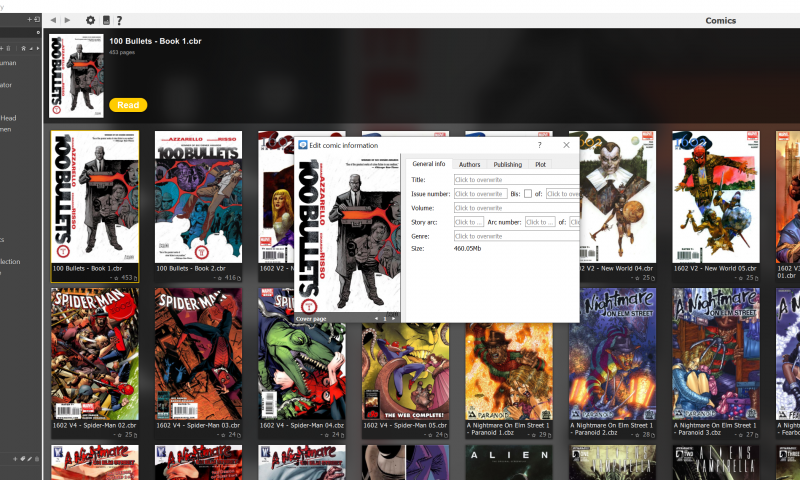
Please Log in or Create an account to join the conversation.
- Luis Ángel
-

- Offline
- Administrator
-

Less
More
- Posts: 3354
- Thank you received: 692
4 years 7 months ago #6611
by Luis Ángel
Contribute to the project becoming a patron: www.patreon.com/yacreader
You can also donate via Pay-Pal: www.paypal.com/donate?business=5TAMNQCDD...e=Support+YACReader\
Replied by Luis Ángel on topic "Edit comic information" window too small
Are you using an HDPI screen? Do you mind trying the latest dev build?
github.com/YACReader/yacreader-dev-builds/releases
Contribute to the project becoming a patron: www.patreon.com/yacreader
You can also donate via Pay-Pal: www.paypal.com/donate?business=5TAMNQCDD...e=Support+YACReader\
The following user(s) said Thank You: PsychoNerd
Please Log in or Create an account to join the conversation.
- PsychoNerd
-
Topic Author
- Offline
- New Member
-
Less
More
- Posts: 4
- Thank you received: 0
4 years 7 months ago #6613
by PsychoNerd
Replied by PsychoNerd on topic "Edit comic information" window too small
First of all, thank you for the quick response. I don't think it's HDPI.
This
is the monitor I'm using and a DPI detector says it's 157 DPI. The dev build does appear to have fixed the issue, though it made everything else bigger, too. I don't know if it was intentional, but the UI feels twice as big as it needs to be for my resolution. Regardless, you fixed the problem I was having, so thank you.
Please Log in or Create an account to join the conversation.
- Luis Ángel
-
- Offline
- Administrator
-
Less
More
- Posts: 3354
- Thank you received: 692
4 years 7 months ago #6614
by Luis Ángel
Contribute to the project becoming a patron: www.patreon.com/yacreader
You can also donate via Pay-Pal: www.paypal.com/donate?business=5TAMNQCDD...e=Support+YACReader\
Replied by Luis Ángel on topic "Edit comic information" window too small
What's the screen scale you are using in your monitor? If it is 100% the size of the app's windows should be the same as before. I am adding HDPI and scale support in the next release so it would be great to hear about your setup.
Contribute to the project becoming a patron: www.patreon.com/yacreader
You can also donate via Pay-Pal: www.paypal.com/donate?business=5TAMNQCDD...e=Support+YACReader\
The following user(s) said Thank You: PsychoNerd
Please Log in or Create an account to join the conversation.
- PsychoNerd
-
Topic Author
- Offline
- New Member
-
Less
More
- Posts: 4
- Thank you received: 0
4 years 7 months ago #6616
by PsychoNerd
Replied by PsychoNerd on topic "Edit comic information" window too small
I'm actually at 150%, which it says is the recommended scale. I checked 100% and 125% and they both seemed to be the same size (as each other, not as at 150%), which makes the text too small for me. Honestly, as I'm getting used to the UI the only thing I'd really like changed is letting me shrink the comics more. Even at the smallest setting the covers are still pretty big. Just for comparison, the smallest size I'm getting on YACReader is about the same size as the largest size on ComicRack. Then again, that is probably just because of the scaling.
Anyway, HERE is a link to my build on PCPartPicker. I think I included everything. Let me know if you need any other information and thanks again for the help.
Anyway, HERE is a link to my build on PCPartPicker. I think I included everything. Let me know if you need any other information and thanks again for the help.
Please Log in or Create an account to join the conversation.
- Luis Ángel
-
- Offline
- Administrator
-
Less
More
- Posts: 3354
- Thank you received: 692
4 years 7 months ago #6619
by Luis Ángel
Contribute to the project becoming a patron: www.patreon.com/yacreader
You can also donate via Pay-Pal: www.paypal.com/donate?business=5TAMNQCDD...e=Support+YACReader\
Replied by Luis Ángel on topic "Edit comic information" window too small
Thanks! I will take a look at the code and I will ping you to test the next dev build. Scaling should follow whatever you have configured in your desktop.
Contribute to the project becoming a patron: www.patreon.com/yacreader
You can also donate via Pay-Pal: www.paypal.com/donate?business=5TAMNQCDD...e=Support+YACReader\
The following user(s) said Thank You: PsychoNerd
Please Log in or Create an account to join the conversation.
- Luis Ángel
-
- Offline
- Administrator
-
Less
More
- Posts: 3354
- Thank you received: 692
4 years 6 months ago #6651
by Luis Ángel
Contribute to the project becoming a patron: www.patreon.com/yacreader
You can also donate via Pay-Pal: www.paypal.com/donate?business=5TAMNQCDD...e=Support+YACReader\
Replied by Luis Ángel on topic "Edit comic information" window too small
Scaling should work as expected in this build
github.com/YACReader/yacreader-dev-build...es/tag/9.8.2.2203121
Icons may not look the best, but that's work in progress.
Icons may not look the best, but that's work in progress.
Contribute to the project becoming a patron: www.patreon.com/yacreader
You can also donate via Pay-Pal: www.paypal.com/donate?business=5TAMNQCDD...e=Support+YACReader\
The following user(s) said Thank You: PsychoNerd
Please Log in or Create an account to join the conversation.
- PsychoNerd
-
Topic Author
- Offline
- New Member
-
Less
More
- Posts: 4
- Thank you received: 0
4 years 6 months ago #6663
by PsychoNerd
Replied by PsychoNerd on topic "Edit comic information" window too small
The scale is perfect. I included before and after pictures on the smallest setting for comparison. Big improvement.
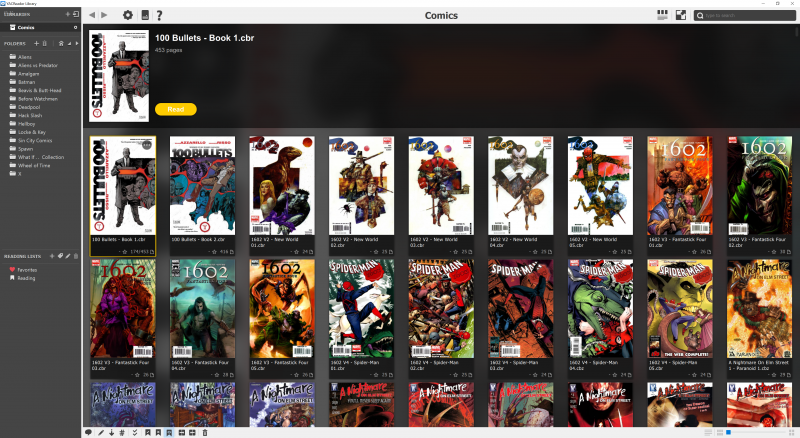
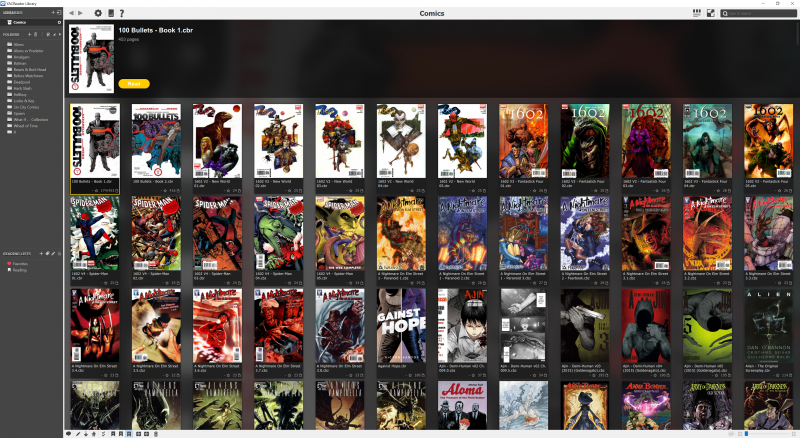
Please Log in or Create an account to join the conversation.
Moderators: Luis Ángel