 YACReader
- Posts: 6
- Thank you received: 1
Help and support for Windows users.
Problems in YACReader..
- demosin
- Topic Author
- Offline
- New Member
-

Less
More
11 years 10 months ago #915
by demosin
Problems in YACReader.. was created by demosin
I have been using YACReader for a couple of weeks.. Everything is so nice and neat.. And it's so far the best in Windows.. But I've found some things that I'm having hard time to deal with..
1. It cannot read any Image files like JPGs and PNGs under a folder unless zipped.. I read manga, so I have some troubles while reading the new chapters whose volume hasn't been released(the files which aren't zipped).. I zip the chapters after the volumes are released along with their volume cover..
2. A. When updating my library after making some changes in the files, it does not change/update its file cover (Volume Cover)..
2. B. After removing files under a folder and when updated, it only updates for the removed files, but not removed their folder from the list.. Basically, it exist as an empty folder.
Lastly, is there any plan on adding touch features in Windows version?
Thanks for reading..
1. It cannot read any Image files like JPGs and PNGs under a folder unless zipped.. I read manga, so I have some troubles while reading the new chapters whose volume hasn't been released(the files which aren't zipped).. I zip the chapters after the volumes are released along with their volume cover..
2. A. When updating my library after making some changes in the files, it does not change/update its file cover (Volume Cover)..
2. B. After removing files under a folder and when updated, it only updates for the removed files, but not removed their folder from the list.. Basically, it exist as an empty folder.
Lastly, is there any plan on adding touch features in Windows version?
Thanks for reading..
Please Log in or Create an account to join the conversation.
- Luis Ángel
-

- Offline
- Administrator
-

Less
More
- Posts: 3354
- Thank you received: 692
11 years 10 months ago #916
by Luis Ángel
Contribute to the project becoming a patron: www.patreon.com/yacreader
You can also donate via Pay-Pal: www.paypal.com/donate?business=5TAMNQCDD...e=Support+YACReader\
Replied by Luis Ángel on topic Problems in YACReader..
1. Why not? YACReader should be able to read any folder with images in it, just press CTRL+O and select the desired folder. Or just drag and drop a folder into it.
2. A. It should be great if you send me a comic file before and after being modified, I mean, two copies of the same comic
2. B. Removing whole folder has been added to the current development version, it will be available for future versions.
I would like to release a metro version of YACReader with full touch support, no ETA yet.
2. A. It should be great if you send me a comic file before and after being modified, I mean, two copies of the same comic
2. B. Removing whole folder has been added to the current development version, it will be available for future versions.
I would like to release a metro version of YACReader with full touch support, no ETA yet.
Contribute to the project becoming a patron: www.patreon.com/yacreader
You can also donate via Pay-Pal: www.paypal.com/donate?business=5TAMNQCDD...e=Support+YACReader\
Please Log in or Create an account to join the conversation.
- demosin
- Topic Author
- Offline
- New Member
-
Less
More
- Posts: 6
- Thank you received: 1
11 years 10 months ago - 11 years 10 months ago #920
by demosin
Replied by demosin on topic Problems in YACReader..
1. I pressed CTRL+O in YAC Library but nothing comes out.. Instead, when I press fn+O it comes a small window to add an existing library and it doesn't import the images under folders.. All I do is make two libraries. One is for my "Ongoing Manga" and another is "Completed Manga". I don't have any problem for Completed Manga since all the files are zipped. Even if they are located under many layers of folders, YAC Library can still read. But in case of Ongoing Manga, for example, Bleach, I put all the new chapters UNZIPPED under a new folder called "Bleach Vol. 65+". Under this folder I have some folders(581,582, etc.) containing image files in each of them.. So, the problem was simple, I made a library with base path as "C:\MANGA\Ongoing" and YAC Library does not load the Bleach Vol. 65+ folder along with the folders and files under it. I uploaded a screenshot too to help you analyze it..
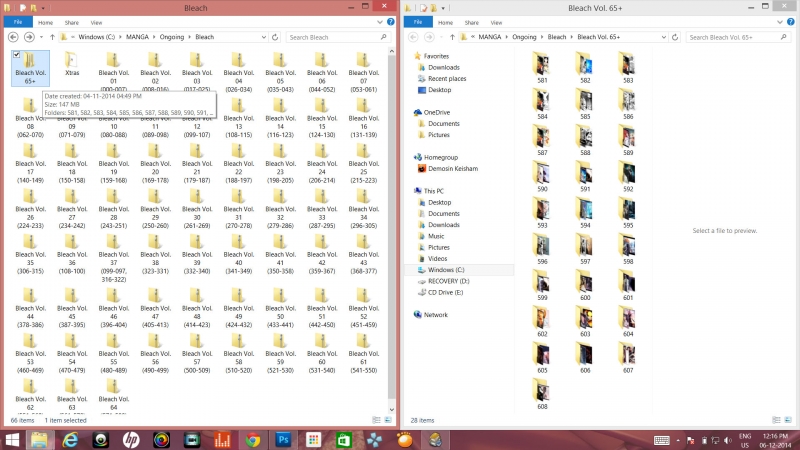

2. This one, I solved it last night.. It's a bit tricky.. When my desired cover image doesn't come out for a file, I unzip the file and rename the desired image so as to make it comes out first in the ascending order.. Then I zip back the file and move to another location and "update the YAC Library." Then, I move back to the original location and update the library again. Now, the YAC Library shows the the file with my new desired cover.
N.B.: In YAC Reader, the ascending order is like this 00>000_>001 but it in Windows, it's 000_>00>001.
Extra: It would be better if you still keep the existing "Double Pages" feature and add an extra feature for "Double Pages (Auto)" where you put two portraits in a page and if a landscape is there, it should not put together with another image.
Haha.. I ended up babbling again.. Thanks a lot.
Edited: Yes, CTRL+O only works in YACReader but it doesn't read any sub-folders. Plus, it's for one time reading only and I have to press CTRL+O, Select and Open to read each chapter.. Actually, I was talking about putting them in my library so I can read them with just a double-click but the problems stated in 1. occurred.
Thanks again..
2. This one, I solved it last night.. It's a bit tricky.. When my desired cover image doesn't come out for a file, I unzip the file and rename the desired image so as to make it comes out first in the ascending order.. Then I zip back the file and move to another location and "update the YAC Library." Then, I move back to the original location and update the library again. Now, the YAC Library shows the the file with my new desired cover.
N.B.: In YAC Reader, the ascending order is like this 00>000_>001 but it in Windows, it's 000_>00>001.
Extra: It would be better if you still keep the existing "Double Pages" feature and add an extra feature for "Double Pages (Auto)" where you put two portraits in a page and if a landscape is there, it should not put together with another image.
Haha.. I ended up babbling again.. Thanks a lot.
Edited: Yes, CTRL+O only works in YACReader but it doesn't read any sub-folders. Plus, it's for one time reading only and I have to press CTRL+O, Select and Open to read each chapter.. Actually, I was talking about putting them in my library so I can read them with just a double-click but the problems stated in 1. occurred.
Thanks again..
Last edit: 11 years 10 months ago by demosin. Reason: I'm updating my answers.
Please Log in or Create an account to join the conversation.
- Luis Ángel
-
- Offline
- Administrator
-
Less
More
- Posts: 3354
- Thank you received: 692
11 years 9 months ago #929
by Luis Ángel
Contribute to the project becoming a patron: www.patreon.com/yacreader
You can also donate via Pay-Pal: www.paypal.com/donate?business=5TAMNQCDD...e=Support+YACReader\
Replied by Luis Ángel on topic Problems in YACReader..
Folders with images are not supported in YACReaderLibrary, only YACReader. Folders with subfolders are not supported in YACReader either.
There is a feature in YACReaderLibrary for selecting your desired cover for a comic: edit a comic and use the left/right buttons in the cover image....demosin wrote: N.B.: In YAC Reader, the ascending order is like this 00>000_>001 but it in Windows, it's 000_>00>001.
This is already implemented and will be ready for the next version.demosin wrote: Extra: It would be better if you still keep the existing "Double Pages" feature and add an extra feature for "Double Pages (Auto)" where you put two portraits in a page and if a landscape is there, it should not put together with another image.
Contribute to the project becoming a patron: www.patreon.com/yacreader
You can also donate via Pay-Pal: www.paypal.com/donate?business=5TAMNQCDD...e=Support+YACReader\
The following user(s) said Thank You: demosin
Please Log in or Create an account to join the conversation.
- demosin
- Topic Author
- Offline
- New Member
-
Less
More
- Posts: 6
- Thank you received: 1
11 years 9 months ago #934
by demosin
Replied by demosin on topic Problems in YACReader..
Thanks Luis..
Sorry, I didn't see that cover page selection tool..
BTW, is there any particular reason why most of Windows based Comic Readers does not support that subfolders thing? Or is it that the coding is very complex or something? I'm just curious because I have been using an android reader app called Perfect Viewer and after using it I think I have become too choosy while searching for Windows Comic Readers.. haha.. It can read files under subfolders and have simple bookshelf system.. But I find your library preset styles the best, it's unique and I can make a clean and organized library.. I can't wait to try your new Yac reader with touch feature on my lappy..
Sorry, I didn't see that cover page selection tool..
BTW, is there any particular reason why most of Windows based Comic Readers does not support that subfolders thing? Or is it that the coding is very complex or something? I'm just curious because I have been using an android reader app called Perfect Viewer and after using it I think I have become too choosy while searching for Windows Comic Readers.. haha.. It can read files under subfolders and have simple bookshelf system.. But I find your library preset styles the best, it's unique and I can make a clean and organized library.. I can't wait to try your new Yac reader with touch feature on my lappy..
Please Log in or Create an account to join the conversation.
- Luis Ángel
-
- Offline
- Administrator
-
Less
More
- Posts: 3354
- Thank you received: 692
11 years 9 months ago - 11 years 9 months ago #939
by Luis Ángel
Contribute to the project becoming a patron: www.patreon.com/yacreader
You can also donate via Pay-Pal: www.paypal.com/donate?business=5TAMNQCDD...e=Support+YACReader\
Replied by Luis Ángel on topic Problems in YACReader..
I guess that most people don't uses 'folders as comics' in a PC. It makes more sense in a mobile device for all the performance/battery usage implications.
The code shouldn't be too complicated, but if I implement this feature soon I will see things like folders with images and comics on them and all sorts of messes .
.
The code shouldn't be too complicated, but if I implement this feature soon I will see things like folders with images and comics on them and all sorts of messes
. Contribute to the project becoming a patron: www.patreon.com/yacreader
You can also donate via Pay-Pal: www.paypal.com/donate?business=5TAMNQCDD...e=Support+YACReader\
Last edit: 11 years 9 months ago by Luis Ángel.
The following user(s) said Thank You: demosin
Please Log in or Create an account to join the conversation.
- demosin
- Topic Author
- Offline
- New Member
-
Less
More
- Posts: 6
- Thank you received: 1
11 years 9 months ago #945
by demosin
Replied by demosin on topic Problems in YACReader..
Thanks Luis..
Now, I've decided to read the latest chapters of ongoing series from my Tab and completed series from YACReader..
I checked your source code today and found that all I've been learning about C++ in the last semester is not even half the basics.. And I guess I'll have to study C++ real hard if I want to personalize this app.. It's going to be a pretty long journey though.. haha..
Now, I've decided to read the latest chapters of ongoing series from my Tab and completed series from YACReader..
I checked your source code today and found that all I've been learning about C++ in the last semester is not even half the basics.. And I guess I'll have to study C++ real hard if I want to personalize this app.. It's going to be a pretty long journey though.. haha..
Please Log in or Create an account to join the conversation.
- selmf
- Offline
- Moderator
-

Less
More
- Posts: 639
- Thank you received: 136
11 years 9 months ago #946
by selmf
My answers are not necessarily official YACReader statements but mostly represent my own opinion in technical matters.
Replied by selmf on topic Problems in YACReader..
It's not that hard to personalize YACReader. It depends on what you're trying to do. Start by compiling YACReader yourself and then slowly continue from there. YACReader uses Qt so you'll have to familarize yourself with that. Knowing how to use a debugger is also really helpfull.
My answers are not necessarily official YACReader statements but mostly represent my own opinion in technical matters.
Please Log in or Create an account to join the conversation.
Moderators: Luis Ángel