 YACReader
- Posts: 4
- Thank you received: 0
Help and support for Windows users.
Scrolling
- droidberg
- Topic Author
- Offline
- New Member
-

Less
More
13 years 2 months ago - 13 years 2 months ago #98
by droidberg
Scrolling was created by droidberg
hey Luis i seem to be having a problem with YAC. i started loading my comic collection last night and i noticed a few things. after a few libraries i noticed that i couldn't click on the one i wanted. for example, i clicked on idolized it would select another one. randomly. i cant even click the libraries at the bottom. also, the series titles over lap with the buttons on the left for some reason. this has stopped me from adding anymore libraries at the moment.anyway, keep up the great work!

pc specs:
Win x64
32GB Ram
intel i5
YAC v.6.5.3
update:
so it turns out that the more libraries i add the smaller the text in the libraries pane gets.
pc specs:
Win x64
32GB Ram
intel i5
YAC v.6.5.3
update:
so it turns out that the more libraries i add the smaller the text in the libraries pane gets.
Last edit: 13 years 2 months ago by droidberg.
Please Log in or Create an account to join the conversation.
- Luis Ángel
-

- Offline
- Administrator
-

Less
More
- Posts: 3354
- Thank you received: 692
13 years 2 months ago - 13 years 2 months ago #99
by Luis Ángel
Contribute to the project becoming a patron: www.patreon.com/yacreader
You can also donate via Pay-Pal: www.paypal.com/donate?business=5TAMNQCDD...e=Support+YACReader\
Replied by Luis Ángel on topic Scrolling
Hi droidberg,
two days ago a received an e-mail form a user with the same problem. YACReaderLibrary is not designed to work in this way. You are creating a library for each series, you don't need to do this. A library should be created in a folder where you store various series (in subfolders). I have a few libraries, such as: modern comics, golden era comics, not classified comics, etc. The built in search engine only works with subfolders.
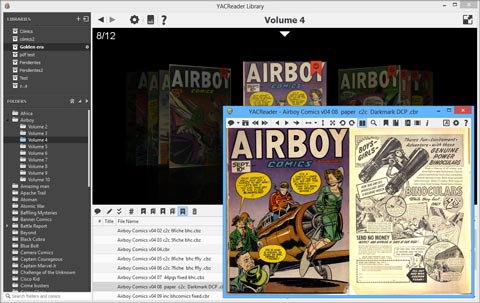
The title problem should be fixed in the next version.
Thanks.
two days ago a received an e-mail form a user with the same problem. YACReaderLibrary is not designed to work in this way. You are creating a library for each series, you don't need to do this. A library should be created in a folder where you store various series (in subfolders). I have a few libraries, such as: modern comics, golden era comics, not classified comics, etc. The built in search engine only works with subfolders.
The title problem should be fixed in the next version.
Thanks.
Contribute to the project becoming a patron: www.patreon.com/yacreader
You can also donate via Pay-Pal: www.paypal.com/donate?business=5TAMNQCDD...e=Support+YACReader\
Last edit: 13 years 2 months ago by Luis Ángel.
Please Log in or Create an account to join the conversation.
Moderators: Luis Ángel