 YACReader
- Posts: 1
- Thank you received: 0
Help and support for MacOSX users.
Library Issues
- Punisher2017
- Topic Author
- Offline
- New Member
-

Less
More
8 years 10 months ago #3442
by Punisher2017
Library Issues was created by Punisher2017
I need to rant about this program!!
As a reader, I think it's great. No issues.
For the last few days though, when I'm trying to organise my comic files I'm getting so many errors.
1. Can't select the library I want - Need to click 2-3 down to access it.
2. Cut down the libraries, then add more folders and it crashes when importing.
3. Creating folders - Drag and drop files which don't appear after copying.
4. Even files being copied back onto my hard drive and not appearing in the YAC Reader Library!!
So frustrating, I'm sure I'm not doing anything wrong.
As a reader, I think it's great. No issues.
For the last few days though, when I'm trying to organise my comic files I'm getting so many errors.
1. Can't select the library I want - Need to click 2-3 down to access it.
2. Cut down the libraries, then add more folders and it crashes when importing.
3. Creating folders - Drag and drop files which don't appear after copying.
4. Even files being copied back onto my hard drive and not appearing in the YAC Reader Library!!
So frustrating, I'm sure I'm not doing anything wrong.
Please Log in or Create an account to join the conversation.
- skrimaging
-

- Offline
- Junior Member
-

Less
More
- Posts: 24
- Thank you received: 4
8 years 10 months ago #3443
by skrimaging
Replied by skrimaging on topic Library Issues
I have a single librarie that contains all my comics.. I organize mine by creating folders for each comic series.. some are nested in folders (for example: studio/series/story arch)
Have never had any issues with this workflow.. I think the best way to use YAC library is having 1 library. I think the developer even mentioned this in past forum posts.
my iTunes library works the same way.. only one library not many.
Have never had any issues with this workflow.. I think the best way to use YAC library is having 1 library. I think the developer even mentioned this in past forum posts.
my iTunes library works the same way.. only one library not many.
The following user(s) said Thank You: Luis Ángel
Please Log in or Create an account to join the conversation.
- Luis Ángel
-

- Offline
- Administrator
-

Less
More
- Posts: 3354
- Thank you received: 692
8 years 10 months ago #3457
by Luis Ángel
Contribute to the project becoming a patron: www.patreon.com/yacreader
You can also donate via Pay-Pal: www.paypal.com/donate?business=5TAMNQCDD...e=Support+YACReader\
Replied by Luis Ángel on topic Library Issues
Punisher2017, you should use a single library. More than one are only needed if you have comics in different physical locations.
So just create a library in the foldee containing all your comics, f.e.
You can update your library by pressing U in your keyboard, that should import any new comic or folders added.
So just create a library in the foldee containing all your comics, f.e.
Code:
/Users/Punisher2017/My Comics
You can update your library by pressing U in your keyboard, that should import any new comic or folders added.
Contribute to the project becoming a patron: www.patreon.com/yacreader
You can also donate via Pay-Pal: www.paypal.com/donate?business=5TAMNQCDD...e=Support+YACReader\
Please Log in or Create an account to join the conversation.
- Kinge
- Offline
- New Member
-
Less
More
- Posts: 6
- Thank you received: 0
8 years 10 months ago #3467
by Kinge
Replied by Kinge on topic Library Issues
I just realized this and spend weeks sorting my comics by era with multiple subfolders for the series, series group, volume, etc. Are there plans to have YAC read subfolders?
Please Log in or Create an account to join the conversation.
- Luis Ángel
-
- Offline
- Administrator
-
Less
More
- Posts: 3354
- Thank you received: 692
8 years 10 months ago - 8 years 10 months ago #3471
by Luis Ángel
It supports subfolders since the first release. You only have to create your library in the most top level folder containing your collection...
Contribute to the project becoming a patron: www.patreon.com/yacreader
You can also donate via Pay-Pal: www.paypal.com/donate?business=5TAMNQCDD...e=Support+YACReader\
Replied by Luis Ángel on topic Library Issues
Kinge wrote: I just realized this and spend weeks sorting my comics by era with multiple subfolders for the series, series group, volume, etc. Are there plans to have YAC read subfolders?
It supports subfolders since the first release. You only have to create your library in the most top level folder containing your collection...
Contribute to the project becoming a patron: www.patreon.com/yacreader
You can also donate via Pay-Pal: www.paypal.com/donate?business=5TAMNQCDD...e=Support+YACReader\
Last edit: 8 years 10 months ago by Luis Ángel.
Please Log in or Create an account to join the conversation.
- Kinge
- Offline
- New Member
-
Less
More
- Posts: 6
- Thank you received: 0
8 years 9 months ago #3491
by Kinge
Replied by Kinge on topic Library Issues
It imports the subfolders true, but it doesn't read past the first level. I have to click on each folder to see what issues are in the folder instead of it reading the contents of the subfolder and displaying them as one library. My library has a comics top level folder with the series sorted in alpha order by folder (A, B, C, etc). In each one, there is another folder for the series (Alpha Flight, Batman, Cable), etc. Yacreader doesn't see inside those folders from the main library view. It's the only way to get Yac to sort group the comics together. Right now, the library is arranged by filename only.
I did a test folder to see how it would look with all the comics in one folder and it worked but now the comics are in order by the filenames and my files start with the issue numbers (#01, #01, #01, #01, #02, #02, #02, #02). I didn't see any other grouping options. Unless I missed them.
I did a test folder to see how it would look with all the comics in one folder and it worked but now the comics are in order by the filenames and my files start with the issue numbers (#01, #01, #01, #01, #02, #02, #02, #02). I didn't see any other grouping options. Unless I missed them.
Please Log in or Create an account to join the conversation.
- Luis Ángel
-
- Offline
- Administrator
-
Less
More
- Posts: 3354
- Thank you received: 692
8 years 9 months ago - 8 years 9 months ago #3492
by Luis Ángel
That's false. YACReaderLibrary has no limit in the number of subfolder levels.

Could you please share a screenshot of your current setup in YACReaderLibrary?
If you want to provide a custom arrangement for your comics and folders (other than the one you have in your hard disk) you have to create reading lists, you can create sublists and sort comics and folders by drag & drop.
Contribute to the project becoming a patron: www.patreon.com/yacreader
You can also donate via Pay-Pal: www.paypal.com/donate?business=5TAMNQCDD...e=Support+YACReader\
Replied by Luis Ángel on topic Library Issues
Kinge wrote: ...but it doesn't read past the first level...
That's false. YACReaderLibrary has no limit in the number of subfolder levels.
Could you please share a screenshot of your current setup in YACReaderLibrary?
If you want to provide a custom arrangement for your comics and folders (other than the one you have in your hard disk) you have to create reading lists, you can create sublists and sort comics and folders by drag & drop.
Contribute to the project becoming a patron: www.patreon.com/yacreader
You can also donate via Pay-Pal: www.paypal.com/donate?business=5TAMNQCDD...e=Support+YACReader\
Last edit: 8 years 9 months ago by Luis Ángel.
Please Log in or Create an account to join the conversation.
- Kinge
- Offline
- New Member
-
Less
More
- Posts: 6
- Thank you received: 0
8 years 9 months ago #3495
by Kinge
Replied by Kinge on topic Library Issues
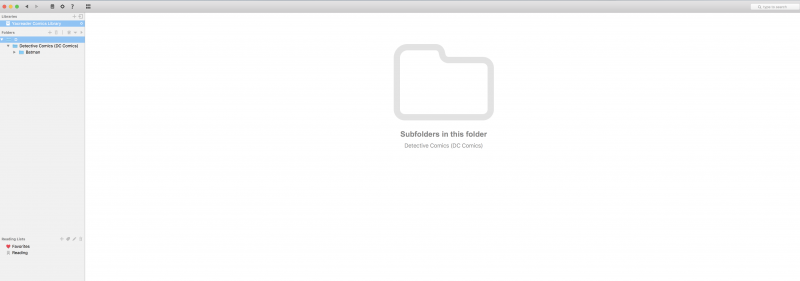
I'm not describing it correctly so my apologies. Let me try this using your screenshot as an example.
Yes, you can see the subfolders as displayed there. But if I select the B folder, and there are not any comics in that folder, then I won't see any. In order to see the comics in the subfolders, I have to select Beast or Bee or Buffalo. What I was referring to was a case where a user could select B and coverflow would display comics from Beast, Bee, and Buffalo in the display. In the screenshot, instead of saying what subfolders are in that folder, it would display the comic books.
I thought that when you add a folder to the library, YAC would scan the folder and subfolders, and pull them into one main library to view all the comics together. It does add the folders as displayed below, but as I mentioned, I would have to select each folder to view the issues.
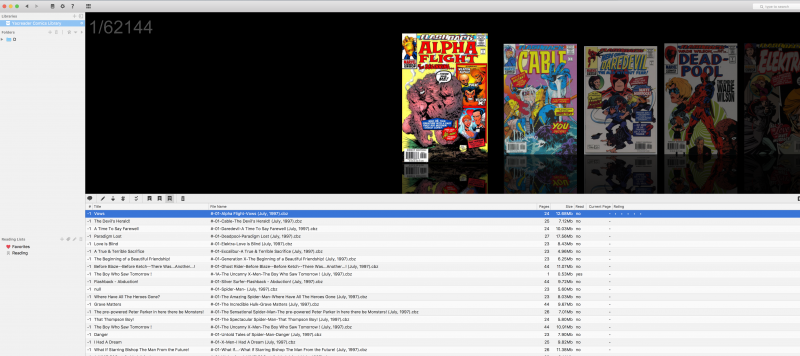
Reading through how the library works on the forum, I added all my comics to one folder but as you can see, it's showing all the issues by number. I thought tagging them with Comicvine would help sort them since the tags I have are Comicrack tags and not YACReader tags but it didn't.
I started playing around with reading lists but it's a manual process and without the ability to sort by publish date (I like to read comics chronologically) it's not an option just yet. I'm still working on some processes like renaming the files in numerical order. I figured since YAC appears to sort by filename this might make the most sense for me right now.
Yes, you can see the subfolders as displayed there. But if I select the B folder, and there are not any comics in that folder, then I won't see any. In order to see the comics in the subfolders, I have to select Beast or Bee or Buffalo. What I was referring to was a case where a user could select B and coverflow would display comics from Beast, Bee, and Buffalo in the display. In the screenshot, instead of saying what subfolders are in that folder, it would display the comic books.
I thought that when you add a folder to the library, YAC would scan the folder and subfolders, and pull them into one main library to view all the comics together. It does add the folders as displayed below, but as I mentioned, I would have to select each folder to view the issues.
Reading through how the library works on the forum, I added all my comics to one folder but as you can see, it's showing all the issues by number. I thought tagging them with Comicvine would help sort them since the tags I have are Comicrack tags and not YACReader tags but it didn't.
I started playing around with reading lists but it's a manual process and without the ability to sort by publish date (I like to read comics chronologically) it's not an option just yet. I'm still working on some processes like renaming the files in numerical order. I figured since YAC appears to sort by filename this might make the most sense for me right now.
Please Log in or Create an account to join the conversation.
- Kinge
- Offline
- New Member
-
Less
More
- Posts: 6
- Thank you received: 0
8 years 9 months ago #3496
by Kinge
Replied by Kinge on topic Library Issues
I'm not describing it correctly so my apologies. Let me try this using your screenshot as an example.
Yes, you can see the subfolders as displayed there. But if I select the B folder, and there are not any comics in that folder, then I won't see any. In order to see the comics in the subfolders, I have to select Beast or Bee or Buffalo. What I was referring to was a case where a user could select B and coverflow would display comics from Beast, Bee, and Buffalo in the display. In the screenshot, instead of saying what subfolders are in that folder, it would display the comic books.
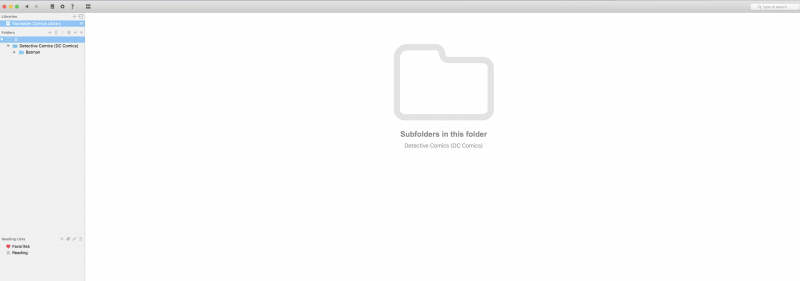
I thought that when you add a folder to the library, YAC would scan the folder and subfolders, and pull them into one main library to view all the comics together. It does add the folders as displayed below, but as I mentioned, I would have to select each folder to view the issues.
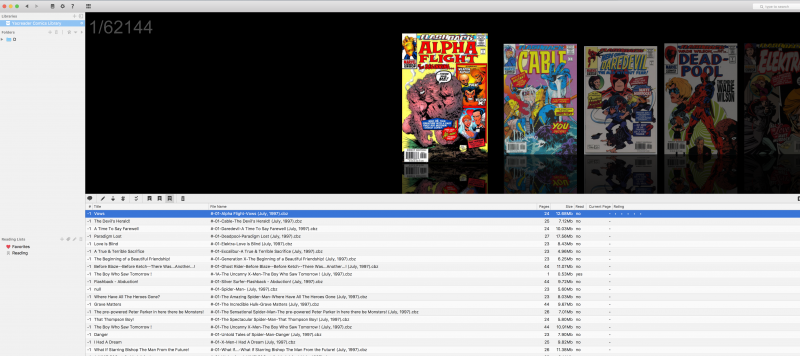
Reading through how the library works on the forum, I added all my comics to one folder but as you can see, it's showing all the issues by number.
I thought tagging them with Comicvine would help sort them since the tags I have are Comicrack tags and not YACReader tags but it didn't.
I started playing around with reading lists but it's a manual process and without the ability to sort by publish date (I like to read comics chronologically) it's not an option just yet. I'm still working on some processes like renaming the files in numerical order. I figured since YAC appears to sort by filename this might make the most sense for me right now.
Yes, you can see the subfolders as displayed there. But if I select the B folder, and there are not any comics in that folder, then I won't see any. In order to see the comics in the subfolders, I have to select Beast or Bee or Buffalo. What I was referring to was a case where a user could select B and coverflow would display comics from Beast, Bee, and Buffalo in the display. In the screenshot, instead of saying what subfolders are in that folder, it would display the comic books.
I thought that when you add a folder to the library, YAC would scan the folder and subfolders, and pull them into one main library to view all the comics together. It does add the folders as displayed below, but as I mentioned, I would have to select each folder to view the issues.
Reading through how the library works on the forum, I added all my comics to one folder but as you can see, it's showing all the issues by number.
I thought tagging them with Comicvine would help sort them since the tags I have are Comicrack tags and not YACReader tags but it didn't.
I started playing around with reading lists but it's a manual process and without the ability to sort by publish date (I like to read comics chronologically) it's not an option just yet. I'm still working on some processes like renaming the files in numerical order. I figured since YAC appears to sort by filename this might make the most sense for me right now.
Please Log in or Create an account to join the conversation.
- Luis Ángel
-
- Offline
- Administrator
-
Less
More
- Posts: 3354
- Thank you received: 692
8 years 9 months ago #3510
by Luis Ángel
Contribute to the project becoming a patron: www.patreon.com/yacreader
You can also donate via Pay-Pal: www.paypal.com/donate?business=5TAMNQCDD...e=Support+YACReader\
Replied by Luis Ángel on topic Library Issues
Folders are just folders, and they behaviour mimics any folder browser you can find out there (finder, file explorer, etc...).
I wouldn't recomend you to change your files at all, just sort the comics in you hard drive the way you want, import everyting into yacreaderlibrary and use reading lists when it's necessary.
I don't know how many users want to see 62000 comics all at once in a single flow....
I agree about the need of adding more sorting capabilites and smart lists, these features will come in future releases.
I wouldn't recomend you to change your files at all, just sort the comics in you hard drive the way you want, import everyting into yacreaderlibrary and use reading lists when it's necessary.
I don't know how many users want to see 62000 comics all at once in a single flow....
I agree about the need of adding more sorting capabilites and smart lists, these features will come in future releases.
Contribute to the project becoming a patron: www.patreon.com/yacreader
You can also donate via Pay-Pal: www.paypal.com/donate?business=5TAMNQCDD...e=Support+YACReader\
Please Log in or Create an account to join the conversation.
Moderators: Luis Ángel