 YACReader
- Posts: 3
- Thank you received: 0
Help and support for Windows users.
Windows 10 "open with YAC" problem
- tristanthorn
- Topic Author
- Offline
- New Member
-

Less
More
10 years 9 months ago - 10 years 9 months ago #1933
by tristanthorn
Windows 10 "open with YAC" problem was created by tristanthorn
Hi
I've been using YACReader for years, and I'm a fan. Thanks for everything.
Recently I upgraded from windows 7 to windows 10, and have noticed a small problem.
In windows 7, I could open a zipped file of images (rar, zip, etc) in YAC by right-clicking the file then "open in // YACReader".
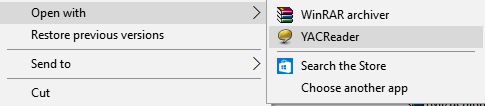
However this is much more difficult in windows 10. Right-clicking a zipped file gives this menu:
snag.gy/XVXav.jpg
You can choose YACReader from the "choose another app" sub-menu, waiting for the next screen to load then choosing YAC, but this all takes time.
So my question is... how can I make win10 "remember" YACReader, and add it to its initial open with menu? Other programs get added automatically once you choose them once (photoshop, etc). But I have to find YAC from a sub-menu everytime. I'm not sure if this is a win10 problem, or if YACReader lacks some kind of ability for windows to recognise it as a program to open rar files.
The only solutions I can think of would be to make YACReader the default program from zip, rar, etc files; or converting all zipped files to their "comic" counterpart (eg. rar to cbr); but I'd rather not do this if I can help it.
Any advice would be appreciated.
I've been using YACReader for years, and I'm a fan. Thanks for everything.
Recently I upgraded from windows 7 to windows 10, and have noticed a small problem.
In windows 7, I could open a zipped file of images (rar, zip, etc) in YAC by right-clicking the file then "open in // YACReader".
However this is much more difficult in windows 10. Right-clicking a zipped file gives this menu:
snag.gy/XVXav.jpg
You can choose YACReader from the "choose another app" sub-menu, waiting for the next screen to load then choosing YAC, but this all takes time.
So my question is... how can I make win10 "remember" YACReader, and add it to its initial open with menu? Other programs get added automatically once you choose them once (photoshop, etc). But I have to find YAC from a sub-menu everytime. I'm not sure if this is a win10 problem, or if YACReader lacks some kind of ability for windows to recognise it as a program to open rar files.
The only solutions I can think of would be to make YACReader the default program from zip, rar, etc files; or converting all zipped files to their "comic" counterpart (eg. rar to cbr); but I'd rather not do this if I can help it.
Any advice would be appreciated.
Last edit: 10 years 9 months ago by tristanthorn.
Please Log in or Create an account to join the conversation.
- Qulox
-

- Offline
- Senior Member
-

Less
More
- Posts: 42
- Thank you received: 8
10 years 9 months ago - 10 years 9 months ago #1934
by Qulox
Replied by Qulox on topic Windows 10 "open with YAC" problem
I have the same problem, I even tried using this guide:
superuser.com/questions/981962/manually-...n-with-in-windows-10
using the "Default Programs Editor" program but it still doesn't appear in the open with menu.
Edit: I've also tried this other guide (the first answer): superuser.com/questions/690106/add-items...th-list-in-windows-8 , and adding the string value "C:\Program Files (x86)\YACReader\YACReader.exe.ApplicationCompany""YACReader" seems like it made it work now in .rar and .7z files but not in .zip files.
Edit2: It works now! I had to use both guides, first I removed the YACReader entries using the first program, then I added the registry string and rebooted. Then I opened a rar, zip and 7z file with YACReader using the open with dialog and re-added YACReader to zip files using the program. Everything seems to be working fine now.
Edit: I've also tried this other guide (the first answer): superuser.com/questions/690106/add-items...th-list-in-windows-8 , and adding the string value "C:\Program Files (x86)\YACReader\YACReader.exe.ApplicationCompany""YACReader" seems like it made it work now in .rar and .7z files but not in .zip files.
Edit2: It works now! I had to use both guides, first I removed the YACReader entries using the first program, then I added the registry string and rebooted. Then I opened a rar, zip and 7z file with YACReader using the open with dialog and re-added YACReader to zip files using the program. Everything seems to be working fine now.
Last edit: 10 years 9 months ago by Qulox.
The following user(s) said Thank You: tristanthorn
Please Log in or Create an account to join the conversation.
- Luis Ángel
-

- Offline
- Administrator
-

Less
More
- Posts: 3354
- Thank you received: 692
10 years 9 months ago #1936
by Luis Ángel
Contribute to the project becoming a patron: www.patreon.com/yacreader
You can also donate via Pay-Pal: www.paypal.com/donate?business=5TAMNQCDD...e=Support+YACReader\
Replied by Luis Ángel on topic Windows 10 "open with YAC" problem
Thanks Qulox, for sharing your solution.
I will update the installer for fixing this.
I will update the installer for fixing this.
Contribute to the project becoming a patron: www.patreon.com/yacreader
You can also donate via Pay-Pal: www.paypal.com/donate?business=5TAMNQCDD...e=Support+YACReader\
The following user(s) said Thank You: Qulox, tristanthorn
Please Log in or Create an account to join the conversation.
- tristanthorn
- Topic Author
- Offline
- New Member
-
Less
More
- Posts: 3
- Thank you received: 0
10 years 9 months ago #1945
by tristanthorn
Replied by tristanthorn on topic Windows 10 "open with YAC" problem
Thank you Qulox, your solution worked. That registry edit line was the key!
Please Log in or Create an account to join the conversation.
Moderators: Luis Ángel