 YACReader
- Posts: 3354
- Thank you received: 692
YACReader 8.5.0
- Luis Ángel
-
 Topic Author
- Offline
- Administrator
-

Less
More
10 years 8 months ago - 10 years 6 months ago #2084
by Luis Ángel
Contribute to the project becoming a patron: www.patreon.com/yacreader
You can also donate via Pay-Pal: www.paypal.com/donate?business=5TAMNQCDD...e=Support+YACReader\
YACReader 8.5.0 was created by Luis Ángel
YACReader 2.0.5 for iOS has been submited to the app store. So it is time to release YACReader 8.5.0.
By now I will put here links to the release candidate version. Please, let me know if you find any issues. For the first time, YACReader is going to include YACReaderLibraryServer for running a headless version of YACReaderLibrary for serving comics to the iOS app.
* Windows (updated Final Release): www.dropbox.com/s/w8l5dc17pt0p7af/YACRea...in32-OpenGL.exe?dl=0
* Windows ANGLE (for those with OpenGL issues): www.dropbox.com/s/cob9kqz1m1klfeb/YACRea...win32-ANGLE.exe?dl=0
* OSX (updated Final Release): bitbucket.org/luisangelsm/yacreader/down...5.0-MacOSX-Intel.dmg
Note: for running the headless version of YACReaderLibrary in OSX open a console and type:
By now I will put here links to the release candidate version. Please, let me know if you find any issues. For the first time, YACReader is going to include YACReaderLibraryServer for running a headless version of YACReaderLibrary for serving comics to the iOS app.
* Windows (updated Final Release): www.dropbox.com/s/w8l5dc17pt0p7af/YACRea...in32-OpenGL.exe?dl=0
* Windows ANGLE (for those with OpenGL issues): www.dropbox.com/s/cob9kqz1m1klfeb/YACRea...win32-ANGLE.exe?dl=0
* OSX (updated Final Release): bitbucket.org/luisangelsm/yacreader/down...5.0-MacOSX-Intel.dmg
Note: for running the headless version of YACReaderLibrary in OSX open a console and type:
Code:
$> YACReaderLibraryServer/Contents/MacOS/YACReaderLibraryServer start
Contribute to the project becoming a patron: www.patreon.com/yacreader
You can also donate via Pay-Pal: www.paypal.com/donate?business=5TAMNQCDD...e=Support+YACReader\
Last edit: 10 years 6 months ago by Luis Ángel.
Please Log in or Create an account to join the conversation.
- robson.sobral
-

- Offline
- Premium Member
-

10 years 8 months ago #2085
by robson.sobral
Replied by robson.sobral on topic YACReader 8.5.0
Hi, Luis!
Something we need specifically to test? How to run the headless version?
(again, no grid view for me)
Something we need specifically to test? How to run the headless version?
(again, no grid view for me)
Please Log in or Create an account to join the conversation.
- Luis Ángel
-
Topic Author
- Offline
- Administrator
-
Less
More
- Posts: 3354
- Thank you received: 692
10 years 8 months ago #2086
by Luis Ángel
Contribute to the project becoming a patron: www.patreon.com/yacreader
You can also donate via Pay-Pal: www.paypal.com/donate?business=5TAMNQCDD...e=Support+YACReader\
Replied by Luis Ángel on topic YACReader 8.5.0
Yeah, you need the ANGLE version for the grid.
The headless version has to be executed in a command line enviroment (cmd in windows):
It will use the config created by YACReaderLibrary, so you don't need to do anything.
The headless version has to be executed in a command line enviroment (cmd in windows):
Code:
$> YACReaderLibraryServer.exe start
It will use the config created by YACReaderLibrary, so you don't need to do anything.
Contribute to the project becoming a patron: www.patreon.com/yacreader
You can also donate via Pay-Pal: www.paypal.com/donate?business=5TAMNQCDD...e=Support+YACReader\
Please Log in or Create an account to join the conversation.
- robson.sobral
-
- Offline
- Premium Member
-
10 years 7 months ago #2087
by robson.sobral
Replied by robson.sobral on topic YACReader 8.5.0
Yeah!
The headless library is running! Two questions:
- how can I open the full library if I need it?
- does the prompt window have to stay open saying `Logging to C:/Users/XXXXX/AppData/Local/YACReader/YACReaderLibrary/server_log.log`?
Thank you, Luis!
The headless library is running! Two questions:
- how can I open the full library if I need it?
- does the prompt window have to stay open saying `Logging to C:/Users/XXXXX/AppData/Local/YACReader/YACReaderLibrary/server_log.log`?
Thank you, Luis!
Please Log in or Create an account to join the conversation.
- Luis Ángel
-
Topic Author
- Offline
- Administrator
-
Less
More
- Posts: 3354
- Thank you received: 692
10 years 7 months ago #2088
by Luis Ángel
Contribute to the project becoming a patron: www.patreon.com/yacreader
You can also donate via Pay-Pal: www.paypal.com/donate?business=5TAMNQCDD...e=Support+YACReader\
Replied by Luis Ángel on topic YACReader 8.5.0
By now you can only run YACReaderLibrary and YACReaderLibraryServer exclusively. Since the server is in a 'beta' status I want to keep it this way.
The way to run the server in Linux is:
As far as I know there are no equivalent to nohup in Windows (if anyone knows how to do this, please share it). You can try
nssm.cc/
to use YACReaderLibraryServer as a service in Windows (I didn't test it yet).
The way to run the server in Linux is:
Code:
&> nohup ./YACReaderLibraryServer start &
Contribute to the project becoming a patron: www.patreon.com/yacreader
You can also donate via Pay-Pal: www.paypal.com/donate?business=5TAMNQCDD...e=Support+YACReader\
Please Log in or Create an account to join the conversation.
- Commdor
- Offline
- New Member
-

Less
More
- Posts: 1
- Thank you received: 0
10 years 7 months ago #2093
by Commdor
Replied by Commdor on topic YACReader 8.5.0
Hello,
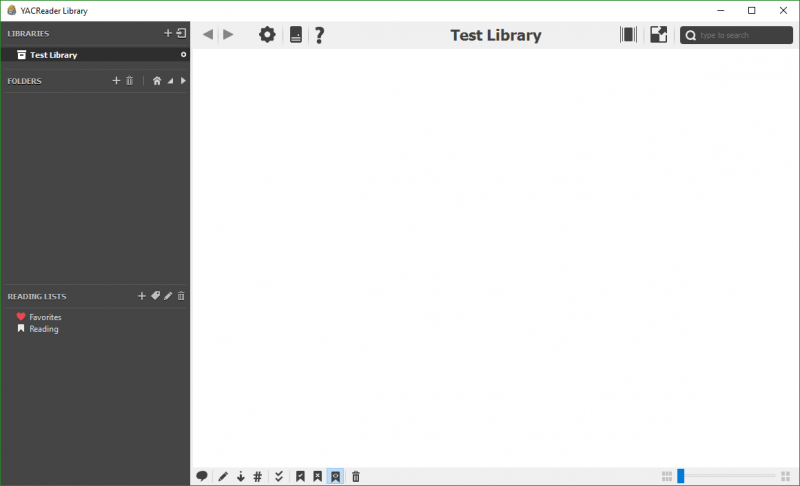
Since I have downloaded and installed the beta 8.5.0 RC1, I have noticed that my covers are no longer appearing in "grid view" mode. I can change to "Comics View" and see the comic covers just fine.
So far, I have tried:
-uninstalling the application and then:
deleting ".yacreaderlibrary" folder in the library folder
deleting AppData\Local\YACReader
reinstalling
creating new library/generating covers from archives
This did not fix the issue
-creating a small 2 comic, 5-page test library with both a .zip and .7z archive.
I still haven't had any luck.
I've attached an image of what I see in grid view mode.
Thankyou for your time
Since I have downloaded and installed the beta 8.5.0 RC1, I have noticed that my covers are no longer appearing in "grid view" mode. I can change to "Comics View" and see the comic covers just fine.
So far, I have tried:
-uninstalling the application and then:
deleting ".yacreaderlibrary" folder in the library folder
deleting AppData\Local\YACReader
reinstalling
creating new library/generating covers from archives
This did not fix the issue
-creating a small 2 comic, 5-page test library with both a .zip and .7z archive.
I still haven't had any luck.
I've attached an image of what I see in grid view mode.
Thankyou for your time
Please Log in or Create an account to join the conversation.
- selmf
- Offline
- Moderator
-

Less
More
- Posts: 639
- Thank you received: 136
10 years 7 months ago #2095
by selmf
My answers are not necessarily official YACReader statements but mostly represent my own opinion in technical matters.
Replied by selmf on topic YACReader 8.5.0
This sounds suspiciously like an error I know from Linux packaging for YACReader. In my case this is triggered by missing qml/qtquick dependencies since they do not get included at compile time. It's possible Luis forgot to include them in RC1.
My answers are not necessarily official YACReader statements but mostly represent my own opinion in technical matters.
Please Log in or Create an account to join the conversation.
- Luis Ángel
-
Topic Author
- Offline
- Administrator
-
Less
More
- Posts: 3354
- Thank you received: 692
10 years 7 months ago #2097
by Luis Ángel
Contribute to the project becoming a patron: www.patreon.com/yacreader
You can also donate via Pay-Pal: www.paypal.com/donate?business=5TAMNQCDD...e=Support+YACReader\
Replied by Luis Ángel on topic YACReader 8.5.0
Yeah, I have check the package and a dependency is missing. So, thank you for reporting the problem Commdor. I will update the binary later.
Contribute to the project becoming a patron: www.patreon.com/yacreader
You can also donate via Pay-Pal: www.paypal.com/donate?business=5TAMNQCDD...e=Support+YACReader\
Please Log in or Create an account to join the conversation.
- Qulox
-

- Offline
- Senior Member
-

Less
More
- Posts: 42
- Thank you received: 8
10 years 7 months ago #2098
by Qulox
Replied by Qulox on topic YACReader 8.5.0
Nice, great update, is always good to see the programs you like keep improving. I haven't found any other bugs apart of these:
>No grid view (Win10 64bits, AMD card) (same as Commdor)
>YacReader again does not appear in "Open with" menu, as posted here
>"A" key for toggling fit to height/width does not work in comic viewer.
>No grid view (Win10 64bits, AMD card) (same as Commdor)
>YacReader again does not appear in "Open with" menu, as posted here
>"A" key for toggling fit to height/width does not work in comic viewer.
Please Log in or Create an account to join the conversation.
- Luis Ángel
-
Topic Author
- Offline
- Administrator
-
Less
More
- Posts: 3354
- Thank you received: 692
10 years 7 months ago #2102
by Luis Ángel
Contribute to the project becoming a patron: www.patreon.com/yacreader
You can also donate via Pay-Pal: www.paypal.com/donate?business=5TAMNQCDD...e=Support+YACReader\
Replied by Luis Ángel on topic YACReader 8.5.0
Thanks Qulox. I will try to fix that in the final release.
BTW, I have updated the windows installer, now the grid should work again.
BTW, I have updated the windows installer, now the grid should work again.
Contribute to the project becoming a patron: www.patreon.com/yacreader
You can also donate via Pay-Pal: www.paypal.com/donate?business=5TAMNQCDD...e=Support+YACReader\
The following user(s) said Thank You: Qulox
Please Log in or Create an account to join the conversation.
Moderators: Luis Ángel