 YACReader
- Posts: 3
- Thank you received: 3
Help and support for Linux users.
How 2 create a YACReader Server using Docker + NAS
- lgottschald
- Topic Author
- Offline
- New Member
-

Less
More
6 years 5 months ago #5182
by lgottschald
How 2 create a YACReader Server using Docker + NAS was created by lgottschald
Hi,
I am posting a step by step guide to use YACReader Server using docker.
My setup is a Qnap NAS using Container Station.
[img size=400]http://https://i13.photobucket.com/albums/a273/mclarry/Docker/01_CS_Start_zpsxopere89.png[/img]
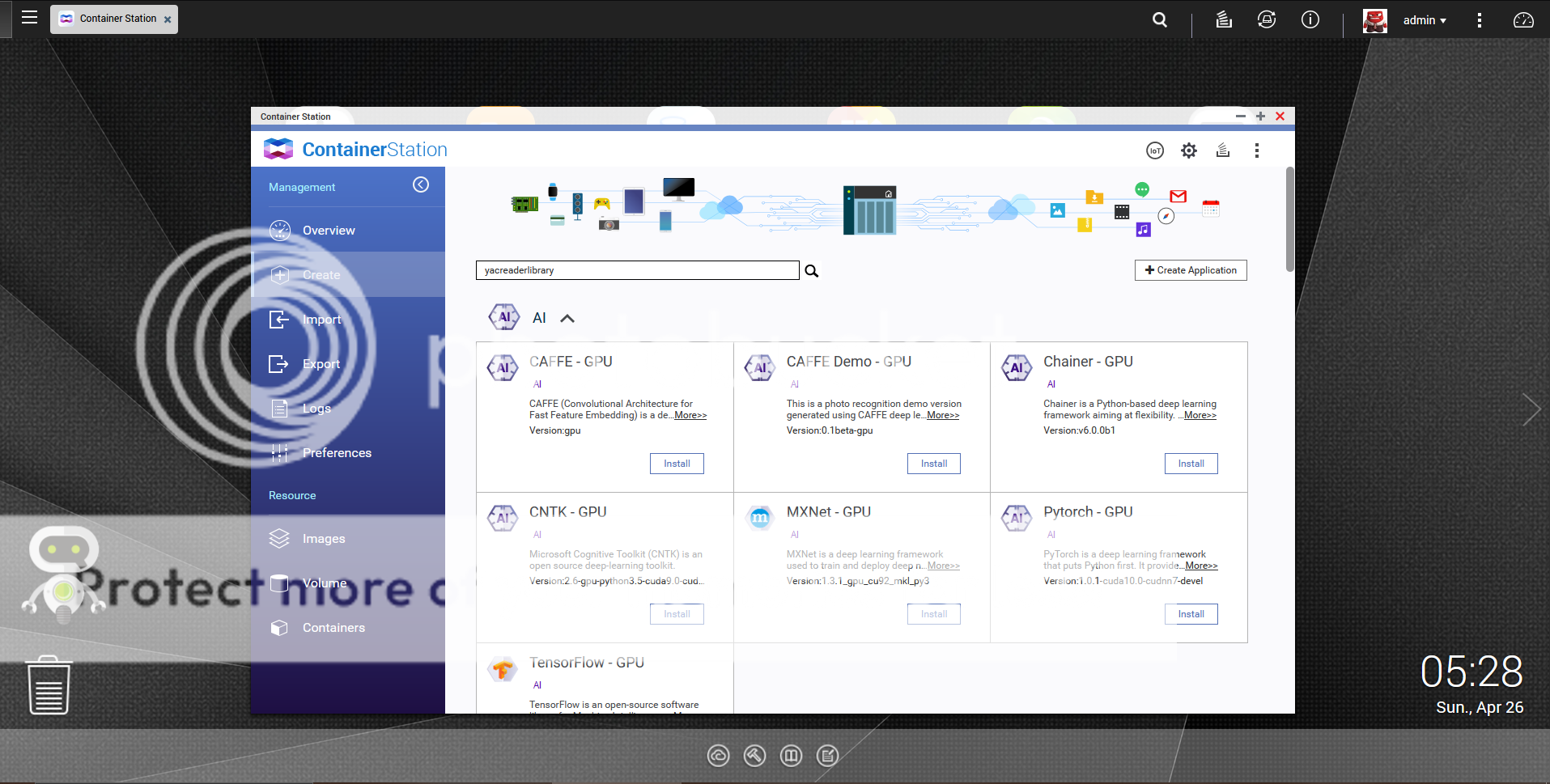
Click Create and type yacreaderlibrary in the search:
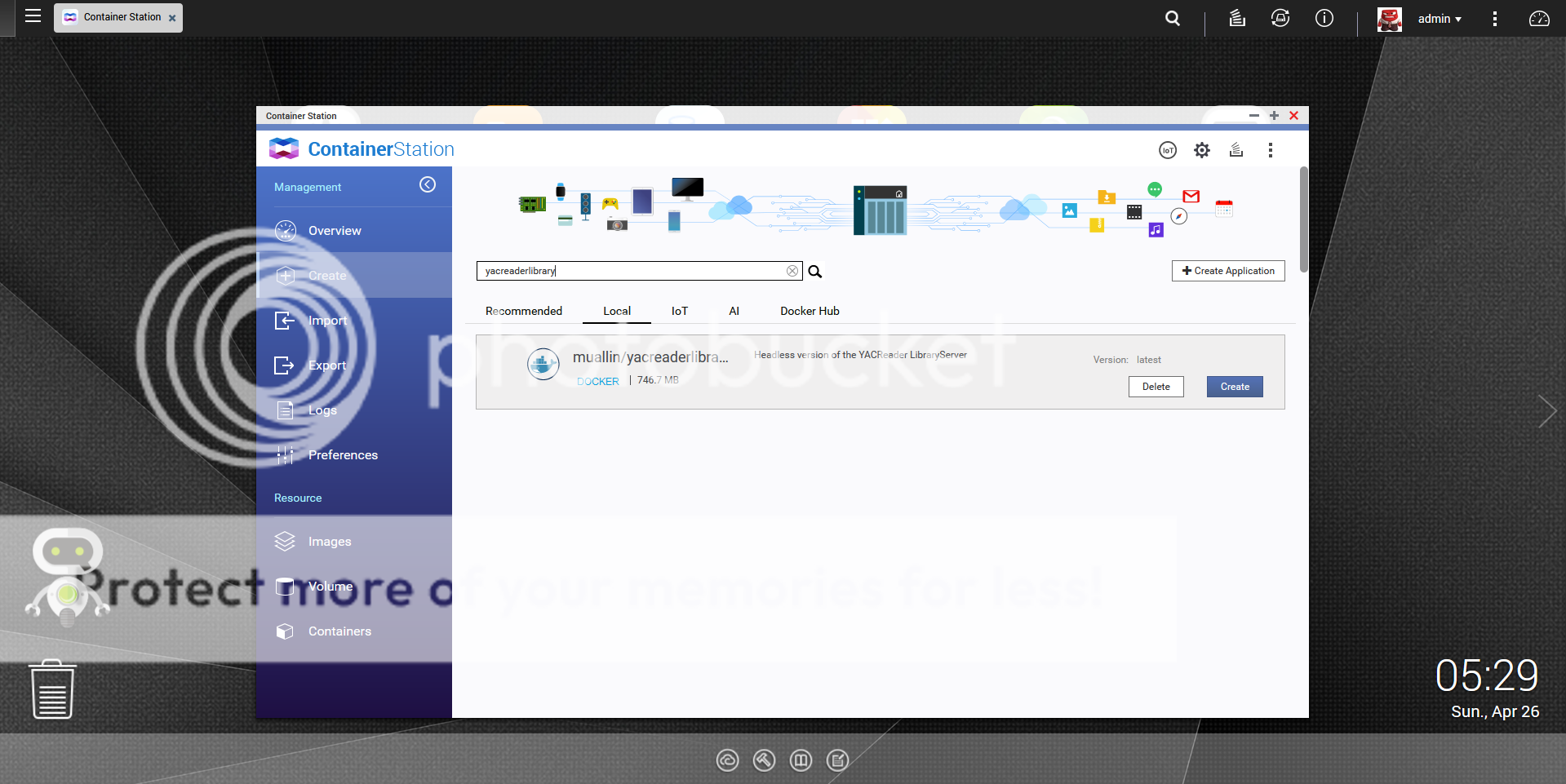
Click to install and after that, you will this result:
Click Create again and you will see a new window:
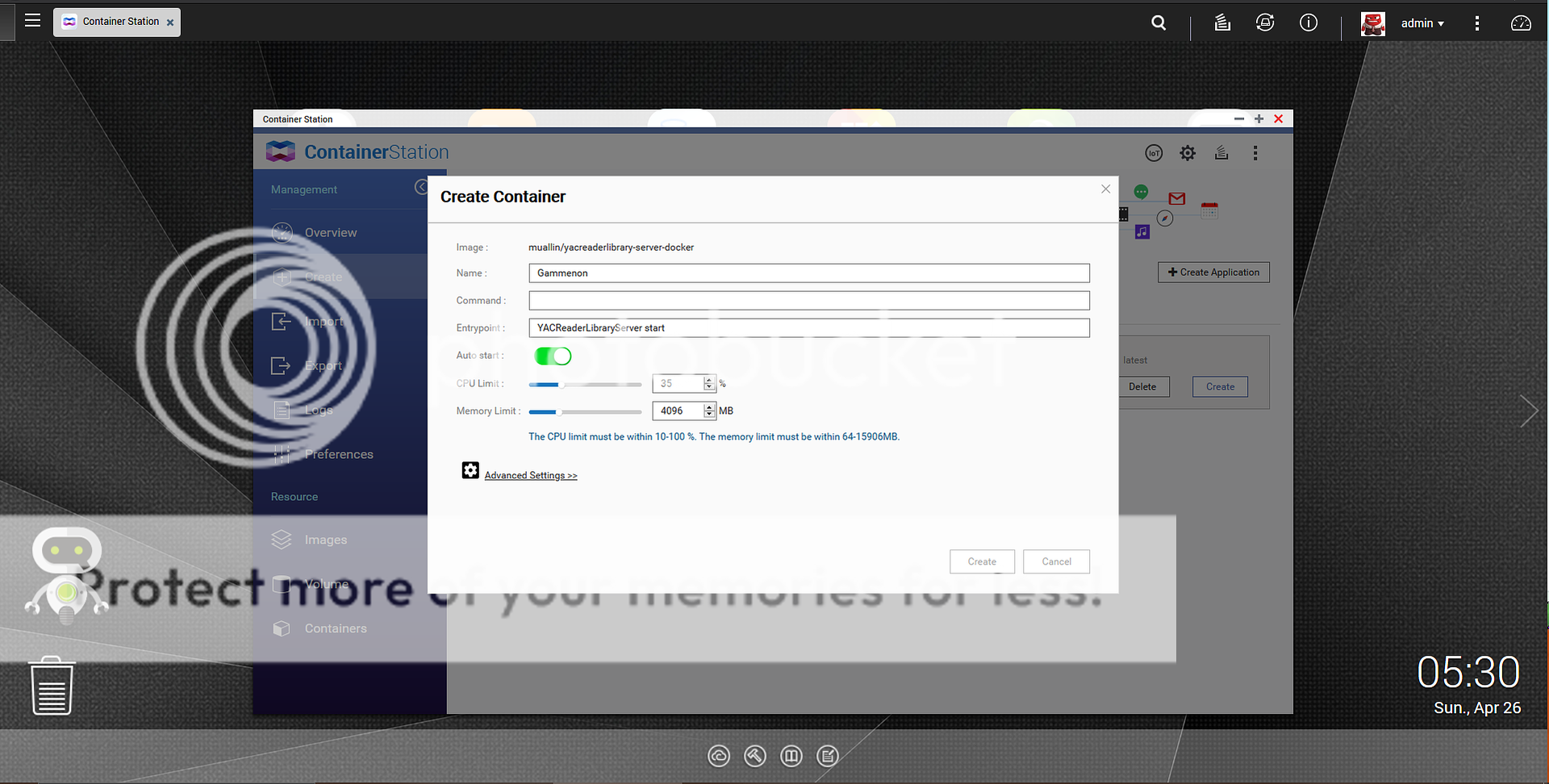
Here you will type the name of your library (mine was called Gammenon), set the CPU and Memory Limit.
After that, click in advanced settings.
Select Network and select the port, if you don't, docker selects one randomly.

Last step in the advanced settings will be Shared Folders.
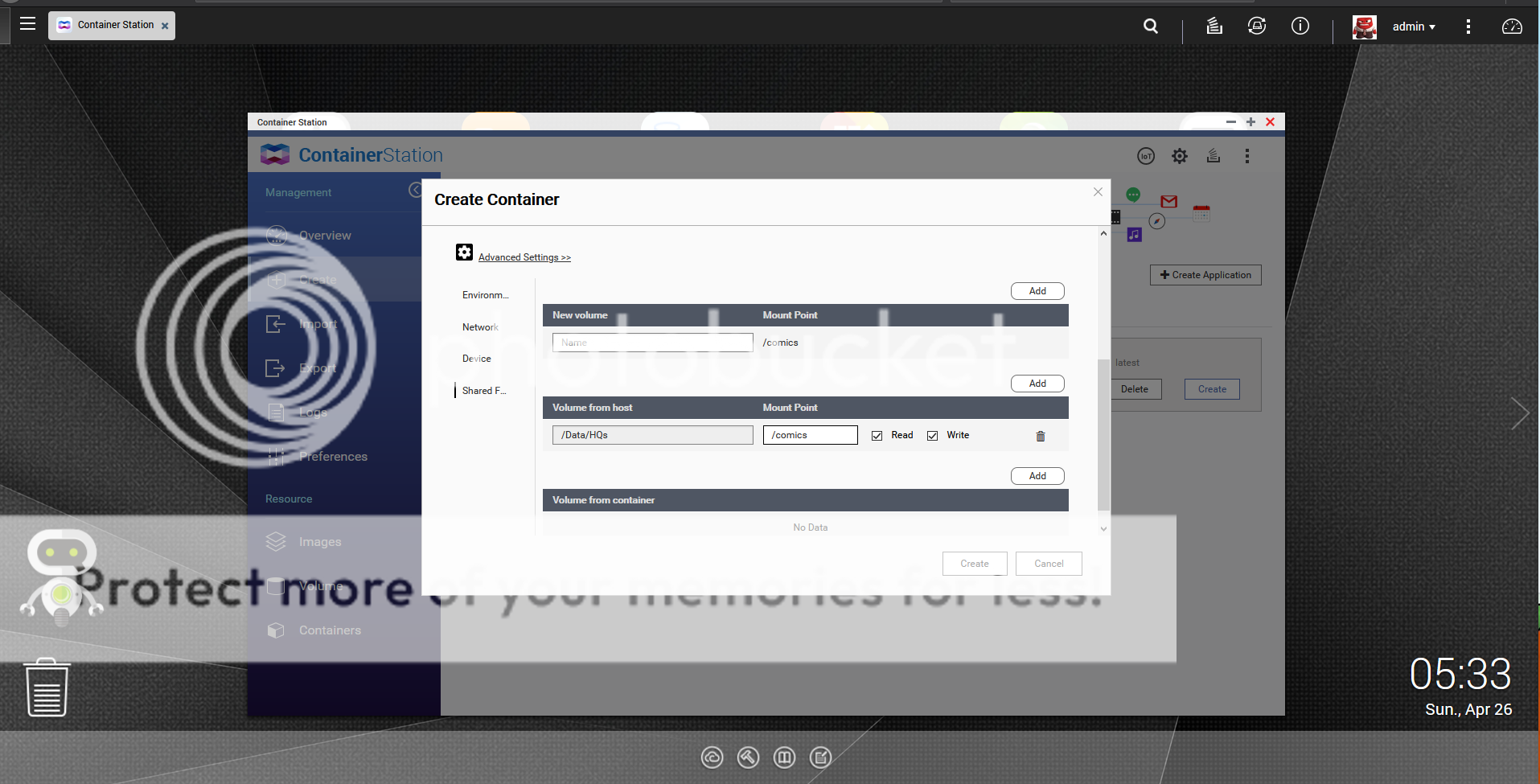
Click add in Volume from Host/Mount Point and Select your Comics folder. In my case, Data/HQs. Type /comics in mount point. Click Create and confirm.
You will see the container running:
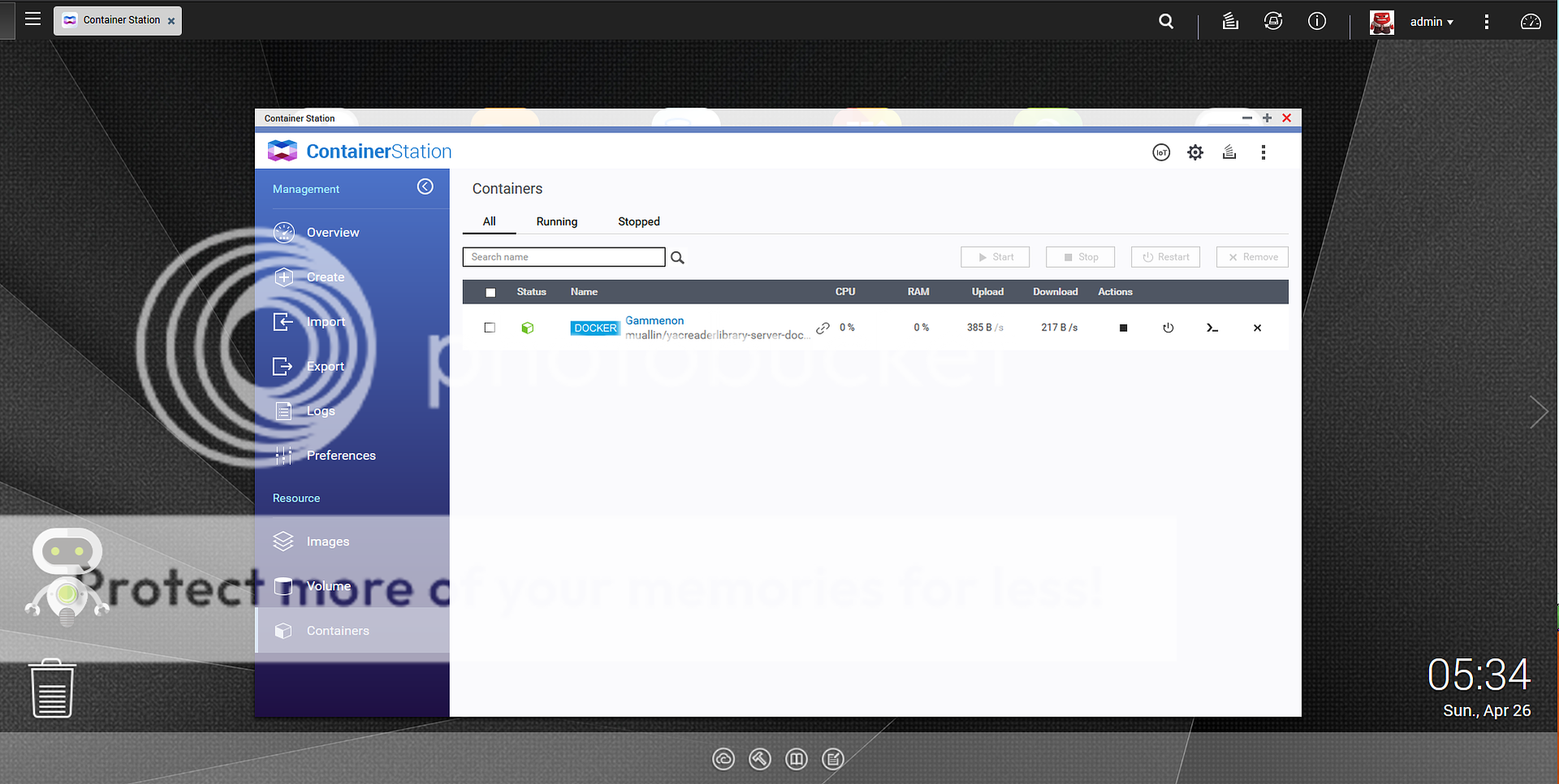
If you click in the server's name, you will be able to check all information about the container:
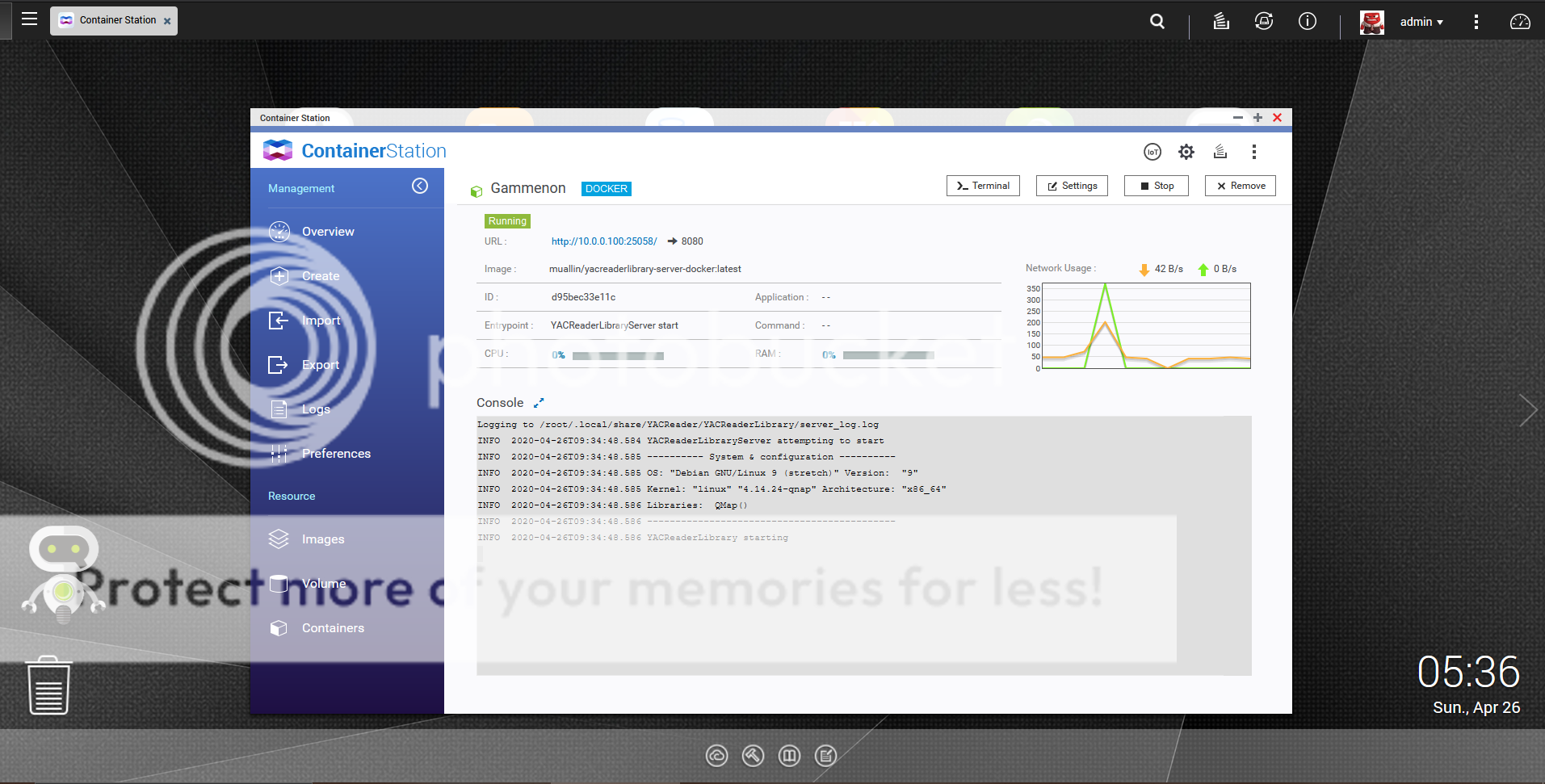
Click in the button Terminal to set a command, adding your library:
YACReaderLibraryServer add-library Gammenon /comics [/b]
- You can put any name, I choose Gammenon. And /comics was the folder name selected when we created and configured the container.
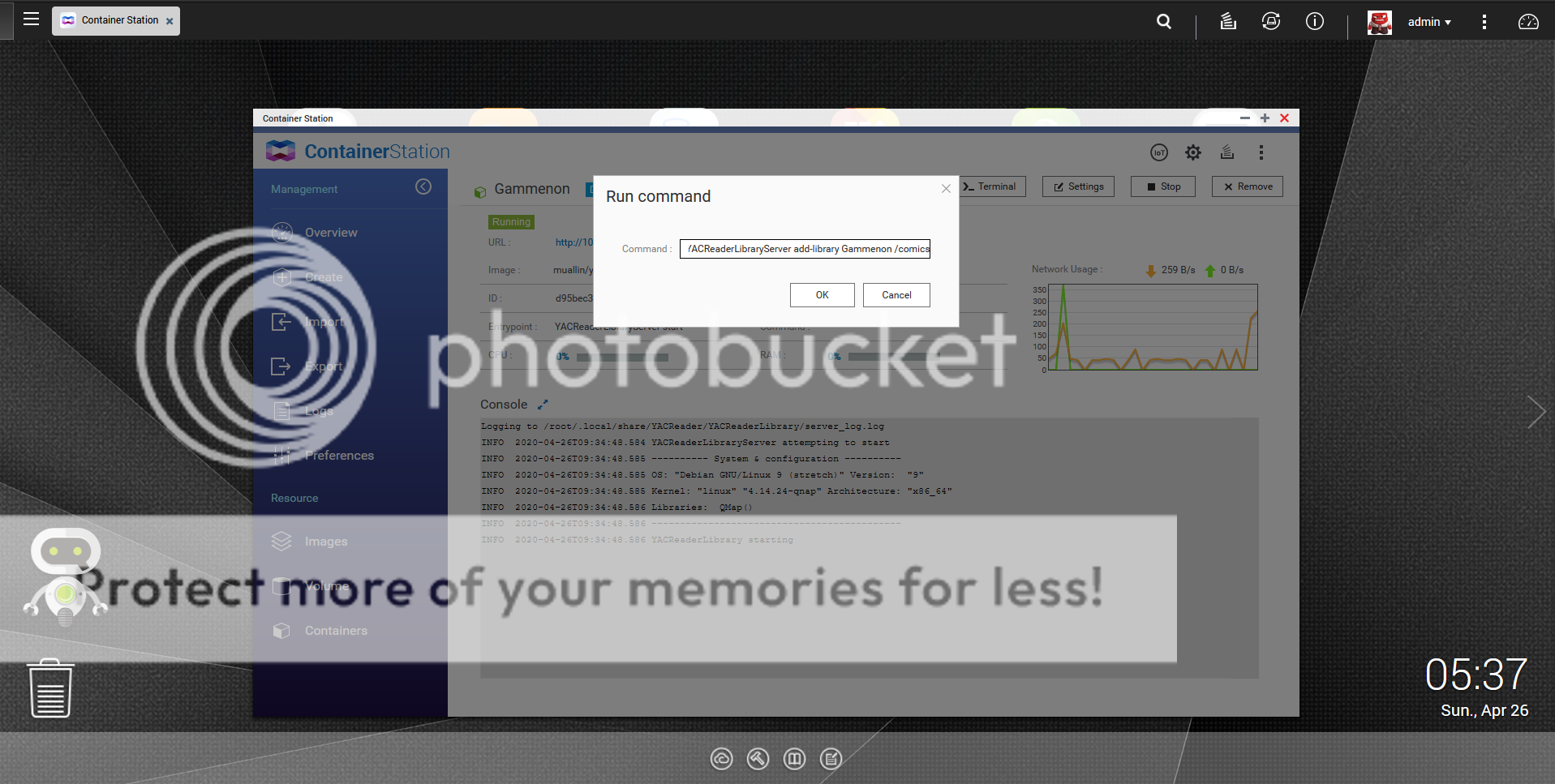
After that click in the link URL:
And you will access your brand new server showing your comics library, just like this:
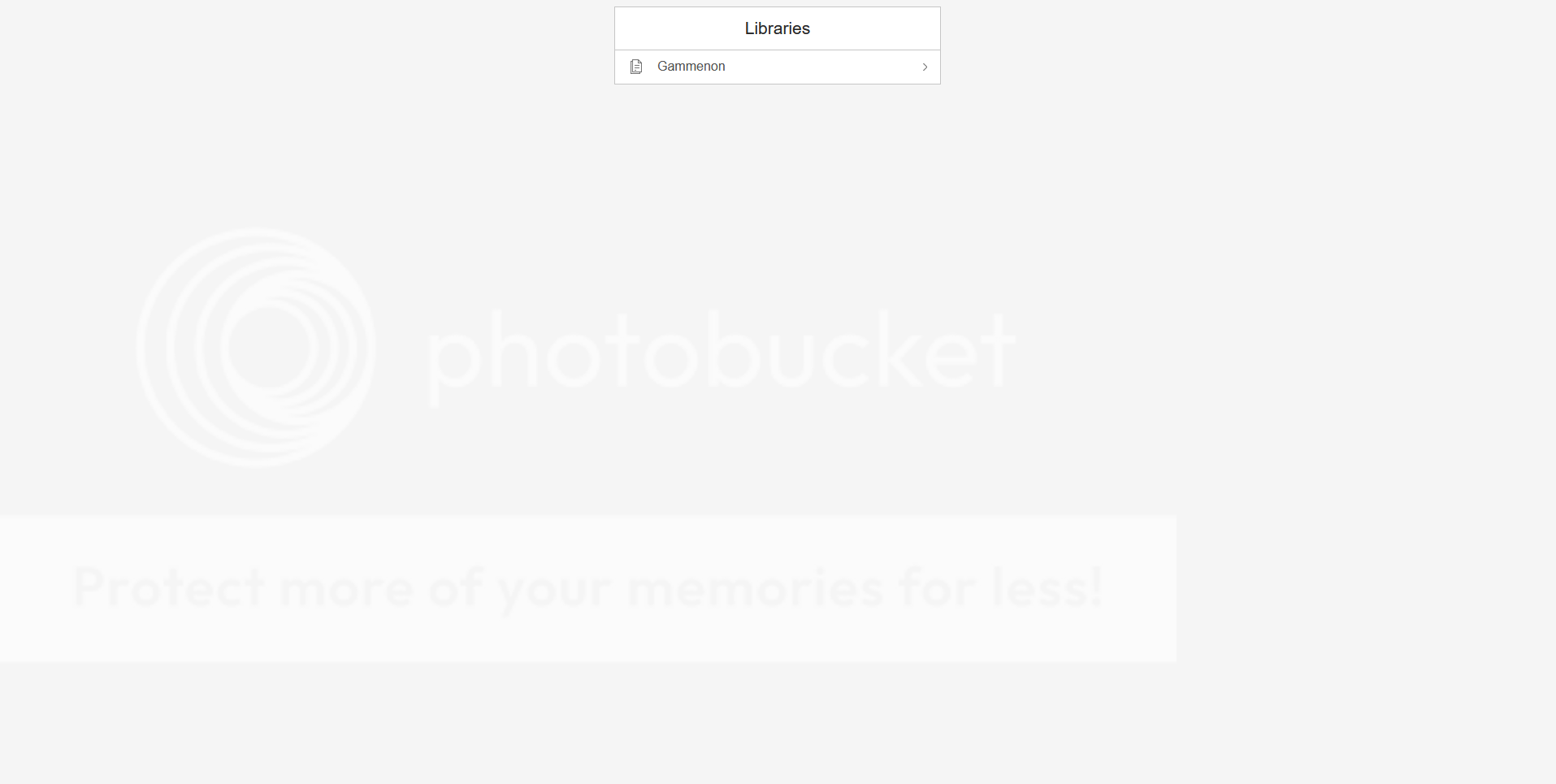
I hope this guide can help you guys.
I am posting a step by step guide to use YACReader Server using docker.
My setup is a Qnap NAS using Container Station.
[img size=400]http://https://i13.photobucket.com/albums/a273/mclarry/Docker/01_CS_Start_zpsxopere89.png[/img]
Click Create and type yacreaderlibrary in the search:
Click to install and after that, you will this result:
Click Create again and you will see a new window:
Here you will type the name of your library (mine was called Gammenon), set the CPU and Memory Limit.
After that, click in advanced settings.
Select Network and select the port, if you don't, docker selects one randomly.
Last step in the advanced settings will be Shared Folders.
Click add in Volume from Host/Mount Point and Select your Comics folder. In my case, Data/HQs. Type /comics in mount point. Click Create and confirm.
You will see the container running:
If you click in the server's name, you will be able to check all information about the container:
Click in the button Terminal to set a command, adding your library:
YACReaderLibraryServer add-library Gammenon /comics [/b]
- You can put any name, I choose Gammenon. And /comics was the folder name selected when we created and configured the container.
After that click in the link URL:
And you will access your brand new server showing your comics library, just like this:
I hope this guide can help you guys.
The following user(s) said Thank You: Luis Ángel, Dampfisten, motardo
Please Log in or Create an account to join the conversation.
- Luis Ángel
-

- Offline
- Administrator
-

Less
More
- Posts: 3354
- Thank you received: 692
6 years 5 months ago #5186
by Luis Ángel
Contribute to the project becoming a patron: www.patreon.com/yacreader
You can also donate via Pay-Pal: www.paypal.com/donate?business=5TAMNQCDD...e=Support+YACReader\
Replied by Luis Ángel on topic How 2 create a YACReader Server using Docker + NAS
I am pinning this, thanks for the tutorial, I am sure lots of users will find it useful.
Contribute to the project becoming a patron: www.patreon.com/yacreader
You can also donate via Pay-Pal: www.paypal.com/donate?business=5TAMNQCDD...e=Support+YACReader\
The following user(s) said Thank You: lgottschald
Please Log in or Create an account to join the conversation.
- prizm
- Offline
- New Member
-
Less
More
- Posts: 9
- Thank you received: 0
6 years 5 months ago #5214
by prizm
Replied by prizm on topic How 2 create a YACReader Server using Docker + NAS
I'm using docker on a Synology NAS, but is there a (correct) way to set server to auto update/refresh the library when new comics are added? Thanks.
Please Log in or Create an account to join the conversation.
- Luis Ángel
-
- Offline
- Administrator
-
Less
More
- Posts: 3354
- Thank you received: 692
6 years 5 months ago #5216
by Luis Ángel
Contribute to the project becoming a patron: www.patreon.com/yacreader
You can also donate via Pay-Pal: www.paypal.com/donate?business=5TAMNQCDD...e=Support+YACReader\
Replied by Luis Ángel on topic How 2 create a YACReader Server using Docker + NAS
Not yet, but I am sure you can automate the process using a script.
Contribute to the project becoming a patron: www.patreon.com/yacreader
You can also donate via Pay-Pal: www.paypal.com/donate?business=5TAMNQCDD...e=Support+YACReader\
Please Log in or Create an account to join the conversation.
- Dampfisten
- Offline
- New Member
-
Less
More
- Posts: 2
- Thank you received: 1
6 years 5 months ago #5224
by Dampfisten
Replied by Dampfisten on topic How 2 create a YACReader Server using Docker + NAS
Hi @lgottschald,
Thanks for the guide.
I'm running a QNAP and managed to create the container per your instructions, however when it comes time to run the command in Terminal;
YACReaderLibraryServer add-library Comics /comics
I'm receiving an error;
Process exited with code 0
And it boots me a black screen displaying "No library database found in directory."
Do you have any advice as to what I'm doing wrong / how to proceed?
Thanks in advance.
Thanks for the guide.
I'm running a QNAP and managed to create the container per your instructions, however when it comes time to run the command in Terminal;
YACReaderLibraryServer add-library Comics /comics
I'm receiving an error;
Process exited with code 0
And it boots me a black screen displaying "No library database found in directory."
Do you have any advice as to what I'm doing wrong / how to proceed?
Thanks in advance.
The following user(s) said Thank You: lgottschald
Please Log in or Create an account to join the conversation.
- Dampfisten
- Offline
- New Member
-
Less
More
- Posts: 2
- Thank you received: 1
6 years 5 months ago - 6 years 5 months ago #5226
by Dampfisten
Replied by Dampfisten on topic Help needed re: YACReader Server using Docker + NA
Hi @lgottschald,
Thanks for the guide - "How 2 create a YACReader Server using Docker + NAS"
Edit:
Okay, progress! I recreated the Docker container - turns out the the container marked "Latest" was actually v9.5 and I reinstalled using the one marked v9.6.
I was able to create a library once using the current version
Problem now is - I've got a library, but don't know how to add any .cbr's to it... Is there clear instruction anywhere?
Thanks for the guide - "How 2 create a YACReader Server using Docker + NAS"
Edit:
Okay, progress! I recreated the Docker container - turns out the the container marked "Latest" was actually v9.5 and I reinstalled using the one marked v9.6.
I was able to create a library once using the current version
Problem now is - I've got a library, but don't know how to add any .cbr's to it... Is there clear instruction anywhere?
Last edit: 6 years 5 months ago by Dampfisten.
Please Log in or Create an account to join the conversation.
- lgottschald
- Topic Author
- Offline
- New Member
-
Less
More
- Posts: 3
- Thank you received: 3
6 years 5 months ago #5234
by lgottschald
Hi,
I forgot to mention that you can use your windows/macOS to install the YACReader Server and create the library first. After that, export and create the .ydb file. When you re-create the container and re-type the command : YACReaderLibraryServer add-library Gammenon /comics will add the library, if you try without a library, won't show anything. I remembered when Luis explained the difference between add-library and create-library. Add-library is to add an existent library ( .ybr ) and create-library is to create a brand new library and scan all the cbr/cbz/pdf and as he said it's better use our PC to do that, would be faster than our Pi/NAS.
about this problem:
// I'm running a QNAP and managed to create the container per your instructions, however when it comes time to run the command in Terminal;
YACReaderLibraryServer add-library Comics /comics
I'm receiving an error;
Process exited with code 0
And it boots me a black screen displaying "No library database found in directory."
Do you have any advice as to what I'm doing wrong / how to proceed? //
Code 0 is success. The syntax was correct, the command was sent and return 0, means no error.
but the YACReader Server returned an error: no library database found because you didn't created a library, as I explained before, add-library, adds a existent library, create-library, creates a new one but if you have tons of comics, will take hours/days to scan all of them. Just install the windows/linux/macOS version, open, create the library, export to create the ydb and try again the command add-library.
about the refresh/add new comics, I didn't add any new comics yet but if it's too complex, I will just open my windows version of YACReader Server, scan again ( he just add the new comics ) and export again the new ydb file. it's like 2 min to open the server, put to scan, export the ydb, restart the container and type the command.
I will try to find if there is way to recreate the container with the command add-library executing automatically, don't know if is possible.
If you need more help let me know.
[]'s
Replied by lgottschald on topic Help needed re: YACReader Server using Docker + NA
Dampfisten wrote: Hi @lgottschald,
Problem now is - I've got a library, but don't know how to add any .cbr's to it... Is there clear instruction anywhere?
Hi,
I forgot to mention that you can use your windows/macOS to install the YACReader Server and create the library first. After that, export and create the .ydb file. When you re-create the container and re-type the command : YACReaderLibraryServer add-library Gammenon /comics will add the library, if you try without a library, won't show anything. I remembered when Luis explained the difference between add-library and create-library. Add-library is to add an existent library ( .ybr ) and create-library is to create a brand new library and scan all the cbr/cbz/pdf and as he said it's better use our PC to do that, would be faster than our Pi/NAS.
about this problem:
// I'm running a QNAP and managed to create the container per your instructions, however when it comes time to run the command in Terminal;
YACReaderLibraryServer add-library Comics /comics
I'm receiving an error;
Process exited with code 0
And it boots me a black screen displaying "No library database found in directory."
Do you have any advice as to what I'm doing wrong / how to proceed? //
Code 0 is success. The syntax was correct, the command was sent and return 0, means no error.
but the YACReader Server returned an error: no library database found because you didn't created a library, as I explained before, add-library, adds a existent library, create-library, creates a new one but if you have tons of comics, will take hours/days to scan all of them. Just install the windows/linux/macOS version, open, create the library, export to create the ydb and try again the command add-library.
about the refresh/add new comics, I didn't add any new comics yet but if it's too complex, I will just open my windows version of YACReader Server, scan again ( he just add the new comics ) and export again the new ydb file. it's like 2 min to open the server, put to scan, export the ydb, restart the container and type the command.
I will try to find if there is way to recreate the container with the command add-library executing automatically, don't know if is possible.
If you need more help let me know.
[]'s
Please Log in or Create an account to join the conversation.
- ST
- Offline
- New Member
-
Less
More
- Posts: 13
- Thank you received: 1
5 years 2 months ago #6143
by ST
Replied by ST on topic Help needed re: YACReader Server using Docker + NA
hi! I have a Terramaster NAS with Docker.
I have installed muallin docker app and its is running, but there is no terminal in the Terramaster.
so I can't run the code:
I have the Mac version and works ok but I would like to install the Yacreader server in the NAS to access to all the comics in my iPad. I can only access to the terminal in the Terramaster by SSH but I don't know what to do next.
I have installed muallin docker app and its is running, but there is no terminal in the Terramaster.
so I can't run the code:
Code:
YACReaderLibraryServer add-library Gammenon /comics [/b]
I have the Mac version and works ok but I would like to install the Yacreader server in the NAS to access to all the comics in my iPad. I can only access to the terminal in the Terramaster by SSH but I don't know what to do next.
Please Log in or Create an account to join the conversation.
- danhackley
- Offline
- Premium Member
-

Less
More
- Posts: 84
- Thank you received: 6
4 years 3 months ago #6812
by danhackley
Replied by danhackley on topic Help needed re: YACReader Server using Docker + NA
I'm also struggling to figure out how to get this to work. I found an "import" action though I can't seem to import my folder of comics as it asks for a file.
Please Log in or Create an account to join the conversation.
- danhackley
- Offline
- Premium Member
-
Less
More
- Posts: 84
- Thank you received: 6
4 years 3 months ago #6813
by danhackley
Replied by danhackley on topic How 2 create a YACReader Server using Docker + NAS
I have instaslled Muallin on my Synology NAS, but how do I get it to import comics? There is an import option, but I can't seem to import my comics folder as it asks for a file.
Please Log in or Create an account to join the conversation.
Moderators: Luis Ángel