 YACReader
- Posts: 5
- Thank you received: 0
Help and support for Linux users.
Can't compile on Debian Jesse
- gokuu
- Topic Author
- Offline
- New Member
-

Less
More
10 years 4 months ago #2358
by gokuu
Can't compile on Debian Jesse was created by gokuu
So, I tried compiling YACReaderLibrary on my headless server and haven't been able to.
I installed QT5 via aptitude, and now have the following packages installed:
I cloned the mercurial repository and tried compiling it, following the instructions on INSTALL.txt (ie, changing into the YACReaderLibrary directory, and running
(thought the instructions say to use
that command is not available on my system. But qmake is actually using QT5, so I think it's the same.
When I try compiling I get this error:
[code]
~/yacreader/YACReaderLibrary$ qmake YACReaderLibraryServer.pro
Project ERROR: Missing dependency: QtCore
[/core]
From searching around the web, I can't find a solution, because QtCore is supposed to be installed by qt5-default.
Any clues on how to solve this?
Thanks
I installed QT5 via aptitude, and now have the following packages installed:
Code:
root@home-server:~# dpkg -l | grep qt5
ii libpoppler-qt5-1:amd64 0.26.5-2+deb8u1 amd64 PDF rendering library (Qt 5 based shared library)
ii libqt5concurrent5:amd64 5.3.2+dfsg-4+deb8u1 amd64 Qt 5 concurrent module
ii libqt5core5a:amd64 5.3.2+dfsg-4+deb8u1 amd64 Qt 5 core module
ii libqt5dbus5:amd64 5.3.2+dfsg-4+deb8u1 amd64 Qt 5 D-Bus module
ii libqt5gui5:amd64 5.3.2+dfsg-4+deb8u1 amd64 Qt 5 GUI module
ii libqt5multimedia5:amd64 5.3.2-5 amd64 Qt 5 Multimedia module
ii libqt5network5:amd64 5.3.2+dfsg-4+deb8u1 amd64 Qt 5 network module
ii libqt5opengl5:amd64 5.3.2+dfsg-4+deb8u1 amd64 Qt 5 OpenGL module
ii libqt5opengl5-dev:amd64 5.3.2+dfsg-4+deb8u1 amd64 Qt 5 OpenGL library development files
ii libqt5printsupport5:amd64 5.3.2+dfsg-4+deb8u1 amd64 Qt 5 print support module
ii libqt5qml5:amd64 5.3.2-4 amd64 Qt 5 QML module
ii libqt5quick5:amd64 5.3.2-4 amd64 Qt 5 Quick library
ii libqt5quickparticles5:amd64 5.3.2-4 amd64 Qt 5 Quick particules module
ii libqt5quicktest5:amd64 5.3.2-4 amd64 Qt 5 Quick Test library
ii libqt5quickwidgets5:amd64 5.3.2-4 amd64 Qt 5 Quick Widgets library
ii libqt5script5:amd64 5.3.2+dfsg-2 amd64 Qt 5 script module
ii libqt5sql5:amd64 5.3.2+dfsg-4+deb8u1 amd64 Qt 5 SQL module
ii libqt5sql5-sqlite:amd64 5.3.2+dfsg-4+deb8u1 amd64 Qt 5 SQLite 3 database driver
ii libqt5test5:amd64 5.3.2+dfsg-4+deb8u1 amd64 Qt 5 test module
ii libqt5webkit5:amd64 5.3.2+dfsg-4 amd64 Web content engine library for Qt
ii libqt5webkit5-dev:amd64 5.3.2+dfsg-4 amd64 Web content engine library for Qt - development files
ii libqt5widgets5:amd64 5.3.2+dfsg-4+deb8u1 amd64 Qt 5 widgets module
ii libqt5xml5:amd64 5.3.2+dfsg-4+deb8u1 amd64 Qt 5 XML module
ii qt5-default 5.3.2+dfsg-4+deb8u1 amd64 Qt 5 development defaults package
ii qt5-qmake:amd64 5.3.2+dfsg-4+deb8u1 amd64 Qt 5 qmake Makefile generator tool
I cloned the mercurial repository and tried compiling it, following the instructions on INSTALL.txt (ie, changing into the YACReaderLibrary directory, and running
Code:
qmake YACReaderLibraryServer.pro
Code:
qmake-qt5
Code:
~/yacreader/YACReaderLibrary$ qmake --version
QMake version 3.0
Using Qt version 5.3.2 in /usr/lib/x86_64-linux-gnu
When I try compiling I get this error:
[code]
~/yacreader/YACReaderLibrary$ qmake YACReaderLibraryServer.pro
Project ERROR: Missing dependency: QtCore
[/core]
From searching around the web, I can't find a solution, because QtCore is supposed to be installed by qt5-default.
Any clues on how to solve this?
Thanks
Please Log in or Create an account to join the conversation.
- selmf
- Offline
- Moderator
-

Less
More
- Posts: 639
- Thank you received: 136
10 years 4 months ago #2359
by selmf
My answers are not necessarily official YACReader statements but mostly represent my own opinion in technical matters.
Replied by selmf on topic Can't compile on Debian Jesse
Hi,
you're probably missing the header files for QtCore. Debian ships these seperately from the runtime files in a package with a -dev suffix. Try this:
This should get you most of the dependencies you need for compilation. As a starting point for other missing dependencies, you can use this list:
This is the list of dependencies for the .deb package of YACReader. You won't need all of this for the server, so just install them "as needed".
you're probably missing the header files for QtCore. Debian ships these seperately from the runtime files in a package with a -dev suffix. Try this:
Code:
apt-get install qtbase5-dev
This should get you most of the dependencies you need for compilation. As a starting point for other missing dependencies, you can use this list:
Code:
qt5-qmake, desktop-file-utils, qtbase5-dev, qtmultimedia5-dev, libpoppler-qt5-dev, qtscript5-dev, libqt5opengl5-dev, libglu1-mesa-dev, libunarr-dev, qtdeclarative5-dev
This is the list of dependencies for the .deb package of YACReader. You won't need all of this for the server, so just install them "as needed".
My answers are not necessarily official YACReader statements but mostly represent my own opinion in technical matters.
The following user(s) said Thank You: gokuu
Please Log in or Create an account to join the conversation.
- gokuu
- Topic Author
- Offline
- New Member
-
Less
More
- Posts: 5
- Thank you received: 0
10 years 4 months ago #2360
by gokuu
Replied by gokuu on topic Can't compile on Debian Jesse
Hello,
Hmm, both the qtbase5-dev and qt5-make package was already installed:
So the error message remains the same
Any other ideas? Sorry about this, but I'm pretty noob when it comes to QT
Hmm, both the qtbase5-dev and qt5-make package was already installed:
Code:
root@home-server:~# apt-get -y -q install qt5-make qtbase5-dev
Reading package lists...
Building dependency tree...
Reading state information...
qt5-default is already the newest version.
qt5-qmake is already the newest version.
qt5-qmake set to manually installed.
qtbase5-dev is already the newest version.
qtbase5-dev set to manually installed.
So the error message remains the same
Any other ideas? Sorry about this, but I'm pretty noob when it comes to QT
Please Log in or Create an account to join the conversation.
- selmf
- Offline
- Moderator
-
Less
More
- Posts: 639
- Thank you received: 136
10 years 4 months ago #2361
by selmf
My answers are not necessarily official YACReader statements but mostly represent my own opinion in technical matters.
Replied by selmf on topic Can't compile on Debian Jesse
Hi,
it turns out I made a mistake when I wrote the dependency check for the headless server. Till I have time to fix it you can run the following command in the YACReaderLibraryServer:
it turns out I made a mistake when I wrote the dependency check for the headless server. Till I have time to fix it you can run the following command in the YACReaderLibraryServer:
Code:
sed -i "s/packagesExist(Qt/packagesExist(Qt5/g" headless_config.pri
My answers are not necessarily official YACReader statements but mostly represent my own opinion in technical matters.
The following user(s) said Thank You: gokuu, AnMartini
Please Log in or Create an account to join the conversation.
- gokuu
- Topic Author
- Offline
- New Member
-
Less
More
- Posts: 5
- Thank you received: 0
10 years 4 months ago #2362
by gokuu
Replied by gokuu on topic Can't compile on Debian Jesse
Yup, that was it!
For the record, these were the commands I used to compile:
Now let's see how this works
Thanks!
For the record, these were the commands I used to compile:
Code:
apt-get install -y -q mercurial qt5-qmake qt5-default qtbase5-dev
apt-get install -y -q libpoppler-qt5-dev libunarr-dev qtscript5-dev
hg clone https://bitbucket.org/luisangelsm/yacreader ~/yacreader
( \
cd ~/yacreader/YACReaderLibrary \
&& sed -i "s/packagesExist(Qt/packagesExist(Qt5/g" headless_config.pri \
&& qmake YACReaderLibraryServer.pro \
&& make \
&& make install \
)
Now let's see how this works
Thanks!
Please Log in or Create an account to join the conversation.
- AnMartini
-

- Offline
- New Member
-
10 years 4 months ago #2378
by AnMartini
- Andrea
Replied by AnMartini on topic Can't compile on Debian Jesse
Hi,
I'm also trying to compile the server (on Raspbian Jesse) and I had the same problem of QtCore, solved following selmf's instruction.
Now when I try to compile I get this error:
I don't understand why, as I installed sqlite3 and these are the packages installed:
Anyone who can help me?
Thank you!
I'm also trying to compile the server (on Raspbian Jesse) and I had the same problem of QtCore, solved following selmf's instruction.
Now when I try to compile I get this error:
Code:
Project MESSAGE: Found QtCore
Project MESSAGE: Found QtGui
Project MESSAGE: Found poppler-qt5
Project MESSAGE: Found QtNetwork
Project MESSAGE: Found QtSql
Project ERROR: Missing dependency: sqlite3
I don't understand why, as I installed sqlite3 and these are the packages installed:
Code:
ii libpoppler-qt5-1:armhf 0.26.5-2+deb8u1 armhf PDF rendering library (Qt 5 based shared library)
ii libpoppler-qt5-dev:armhf 0.26.5-2+deb8u1 armhf PDF rendering library -- development files (Qt 5 interface)
ii libqt5clucene5:armhf 5.3.2-3 armhf Qt 5 CLucene module
ii libqt5concurrent5:armhf 5.3.2+dfsg-4+rpi1 armhf Qt 5 concurrent module
ii libqt5core5a:armhf 5.3.2+dfsg-4+rpi1 armhf Qt 5 core module
ii libqt5dbus5:armhf 5.3.2+dfsg-4+rpi1 armhf Qt 5 D-Bus module
ii libqt5declarative5:armhf 5.3.2-3 armhf Qt Quick 1 module for Qt 5
ii libqt5designer5:armhf 5.3.2-3 armhf Qt 5 designer module
ii libqt5designercomponents5:armhf 5.3.2-3 armhf Qt 5 Designer components module
ii libqt5gui5:armhf 5.3.2+dfsg-4+rpi1 armhf Qt 5 GUI module
ii libqt5help5:armhf 5.3.2-3 armhf Qt 5 help module
ii libqt5multimedia5:armhf 5.3.2-5 armhf Qt 5 Multimedia module
ii libqt5multimediaquick-p5:armhf 5.3.2-5 armhf Qt 5 Multimedia Quick module
ii libqt5multimediawidgets5:armhf 5.3.2-5 armhf Qt 5 Multimedia Widgets module
ii libqt5network5:armhf 5.3.2+dfsg-4+rpi1 armhf Qt 5 network module
ii libqt5opengl5:armhf 5.3.2+dfsg-4+rpi1 armhf Qt 5 OpenGL module
ii libqt5opengl5-dev:armhf 5.3.2+dfsg-4+rpi1 armhf Qt 5 OpenGL library development files
ii libqt5printsupport5:armhf 5.3.2+dfsg-4+rpi1 armhf Qt 5 print support module
ii libqt5qml5:armhf 5.3.2-4+rpi1+b1 armhf Qt 5 QML module
ii libqt5quick5:armhf 5.3.2-4+rpi1+b1 armhf Qt 5 Quick library
ii libqt5quickparticles5:armhf 5.3.2-4+rpi1+b1 armhf Qt 5 Quick particules module
ii libqt5quicktest5:armhf 5.3.2-4+rpi1+b1 armhf Qt 5 Quick Test library
ii libqt5quickwidgets5:armhf 5.3.2-4+rpi1+b1 armhf Qt 5 Quick Widgets library
ii libqt5script5:armhf 5.3.2+dfsg-2 armhf Qt 5 script module
ii libqt5scripttools5:armhf 5.3.2+dfsg-2 armhf Qt 5 script tools module
ii libqt5sql5:armhf 5.3.2+dfsg-4+rpi1 armhf Qt 5 SQL module
ii libqt5sql5-sqlite:armhf 5.3.2+dfsg-4+rpi1 armhf Qt 5 SQLite 3 database driver
ii libqt5test5:armhf 5.3.2+dfsg-4+rpi1 armhf Qt 5 test module
ii libqt5webkit5:armhf 5.3.2+dfsg-4+rpi1 armhf Web content engine library for Qt
ii libqt5widgets5:armhf 5.3.2+dfsg-4+rpi1 armhf Qt 5 widgets module
ii libqt5x11extras5:armhf 5.3.2-2 armhf Qt 5 X11 extras
ii libqt5xml5:armhf 5.3.2+dfsg-4+rpi1 armhf Qt 5 XML module
ii libqt5xmlpatterns5:armhf 5.3.2-2 armhf Qt 5 XML patterns module
ii qt5-doc 5.3.2-3 all Qt 5 API Documentation
ii qt5-qmake:armhf 5.3.2+dfsg-4+rpi1 armhf Qt 5 qmake Makefile generator tool
Anyone who can help me?
Thank you!
- Andrea
Please Log in or Create an account to join the conversation.
- selmf
- Offline
- Moderator
-
Less
More
- Posts: 639
- Thank you received: 136
10 years 4 months ago #2380
by selmf
Not 100% sure if this is really needed to compile the server as we're using sqlite through qt. Basically this will install the header and pkgconfig files for sqlite3, the pkgconfig files being what qmake needs to detect the presence of sqlite3 on your system. It seems I will have to rethink the way I'm currently handling dependency detection for the server build - it was intended to make compilation easier but it seems it has become an obstacle on it's own.
My answers are not necessarily official YACReader statements but mostly represent my own opinion in technical matters.
Replied by selmf on topic Can't compile on Debian Jesse
Code:
apt-get install libsqlite3-dev
Not 100% sure if this is really needed to compile the server as we're using sqlite through qt. Basically this will install the header and pkgconfig files for sqlite3, the pkgconfig files being what qmake needs to detect the presence of sqlite3 on your system. It seems I will have to rethink the way I'm currently handling dependency detection for the server build - it was intended to make compilation easier but it seems it has become an obstacle on it's own.
My answers are not necessarily official YACReader statements but mostly represent my own opinion in technical matters.
The following user(s) said Thank You: AnMartini
Please Log in or Create an account to join the conversation.
- AnMartini
-
- Offline
- New Member
-
10 years 4 months ago - 10 years 4 months ago #2382
by AnMartini
- Andrea
Replied by AnMartini on topic Can't compile on Debian Jesse
Thank you selmf, installing libsqlite3-dev solved the problem.
As I'm on Raspbian I couldn't install unarr, so I downloaded and extracted github.com/zeniko/unarr/archive/master.zip in yacreader/compressed_archive/unarr/
This caused an error because with this commit lzmasdk/Types.h was changed in lzmasdk/7zTypes.h
I solved creating a copy of the file and the build succeeded.
I managed to install YACReaderLibraryServer and it starts without problems. I managed to create a library and to add comics. I thought it all worked fine because it also created the cover file in .yacreaderlibrary/covers. The problem is that when I try to access from my iPhone I see the library, the folder and even the comic with its cover and information without problem, but if I try to import or read it I get an error.
Here the last lines of the log file:
And here are the screenshots from the iPhone app:
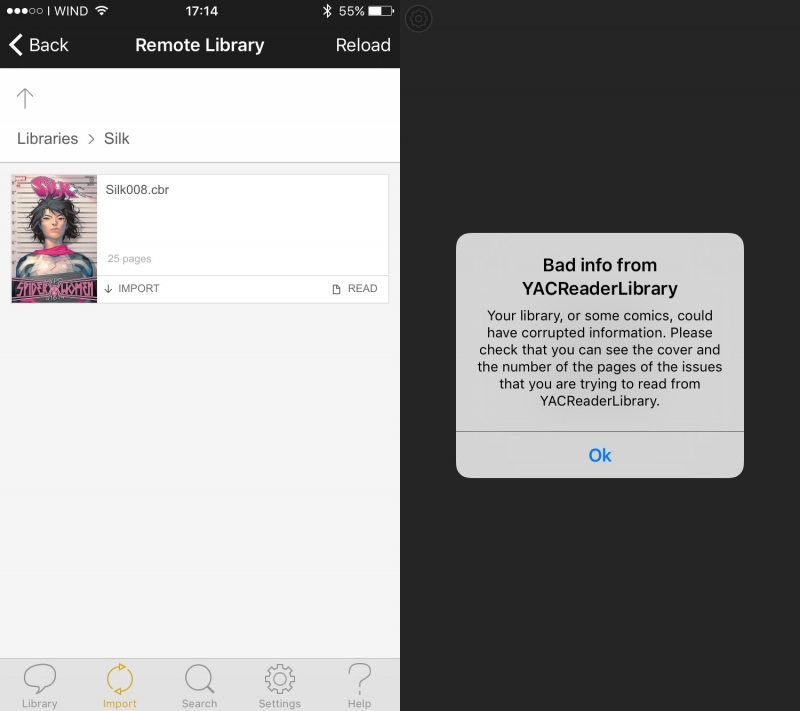
EDIT:
I tried to add other comics and there is the same problem, the strange thing is that the iPhone app can detect the comics that I already imported (using YACReaderLibrary on my Mac) displaying "IMPORTED":
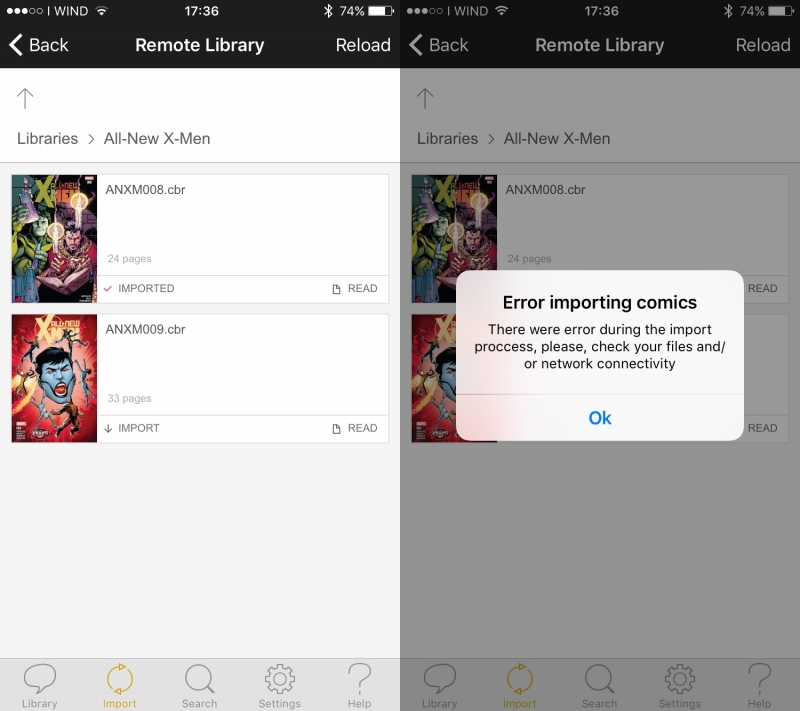
As I'm on Raspbian I couldn't install unarr, so I downloaded and extracted github.com/zeniko/unarr/archive/master.zip in yacreader/compressed_archive/unarr/
This caused an error because with this commit lzmasdk/Types.h was changed in lzmasdk/7zTypes.h
I solved creating a copy of the file and the build succeeded.
I managed to install YACReaderLibraryServer and it starts without problems. I managed to create a library and to add comics. I thought it all worked fine because it also created the cover file in .yacreaderlibrary/covers. The problem is that when I try to access from my iPhone I see the library, the folder and even the comic with its cover and information without problem, but if I try to import or read it I get an error.
Here the last lines of the log file:
Code:
2016-05-13 17:14:08.546 WARNING QSqlDatabasePrivate::addDatabase: duplicate connection name 'Comics/.yacreaderlibrary', old connection removed.
2016-05-13 17:14:08.553 WARNING QSqlDatabasePrivate::addDatabase: duplicate connection name 'Comics/.yacreaderlibrary', old connection removed.
2016-05-13 17:14:08.565 WARNING QSqlDatabasePrivate::addDatabase: duplicate connection name 'Comics/.yacreaderlibrary', old connection removed.
2016-05-13 17:14:08.571 WARNING QSqlDatabasePrivate::addDatabase: duplicate connection name 'Comics/.yacreaderlibrary', old connection removed.
2016-05-13 17:14:08.578 WARNING QSqlDatabasePrivate::addDatabase: duplicate connection name 'Comics/.yacreaderlibrary', old connection removed.
2016-05-13 17:14:08.584 WARNING QSqlDatabasePrivate::addDatabase: duplicate connection name 'Comics/.yacreaderlibrary', old connection removed.
2016-05-13 17:14:08.591 WARNING QSqlQuery::prepare: database not open
2016-05-13 17:14:08.591 WARNING QSqlDatabasePrivate::addDatabase: duplicate connection name '/.yacreaderlibrary', old connection removed.
2016-05-13 17:14:08.592 WARNING QSqlQuery::prepare: database not open
2016-05-13 17:14:08.592 WARNING QSqlDatabasePrivate::addDatabase: duplicate connection name '/.yacreaderlibrary', old connection removed.
2016-05-13 17:14:08.593 WARNING QSqlQuery::prepare: database not open
2016-05-13 17:14:08.593 WARNING QSqlDatabasePrivate::addDatabase: duplicate connection name '/.yacreaderlibrary', old connection removed.
2016-05-13 17:14:08.594 WARNING QSqlQuery::prepare: database not open
2016-05-13 17:14:08.594 WARNING QSqlDatabasePrivate::addDatabase: duplicate connection name '/.yacreaderlibrary', old connection removed.
2016-05-13 17:14:08.594 WARNING QSqlQuery::prepare: database not open
2016-05-13 17:14:08.595 WARNING QSqlDatabasePrivate::addDatabase: duplicate connection name '/.yacreaderlibrary', old connection removed.
2016-05-13 17:14:08.595 WARNING QSqlQuery::prepare: database not open
2016-05-13 17:14:08.596 WARNING QSqlDatabasePrivate::addDatabase: duplicate connection name '/.yacreaderlibrary', old connection removed.
2016-05-13 17:14:08.596 WARNING QSqlQuery::prepare: database not open
2016-05-13 17:14:08.597 WARNING QSqlDatabasePrivate::addDatabase: duplicate connection name '/.yacreaderlibrary', old connection removed.
2016-05-13 17:14:08.597 WARNING QSqlQuery::prepare: database not open
2016-05-13 17:14:08.598 WARNING QSqlDatabasePrivate::addDatabase: duplicate connection name '/.yacreaderlibrary', old connection removed.
2016-05-13 17:14:08.598 WARNING QSqlQuery::prepare: database not open
2016-05-13 17:14:08.598 WARNING QSqlDatabasePrivate::addDatabase: duplicate connection name '/.yacreaderlibrary', old connection removed.
2016-05-13 17:14:08.599 WARNING QSqlQuery::prepare: database not open
2016-05-13 17:14:08.599 WARNING QSqlDatabasePrivate::addDatabase: duplicate connection name '/.yacreaderlibrary', old connection removed.
2016-05-13 17:14:08.600 WARNING QSqlQuery::prepare: database not open
2016-05-13 17:14:08.600 WARNING QSqlDatabasePrivate::addDatabase: duplicate connection name '/.yacreaderlibrary', old connection removed.
2016-05-13 17:14:08.601 WARNING QSqlQuery::prepare: database not open
2016-05-13 17:14:08.601 WARNING QSqlDatabasePrivate::addDatabase: duplicate connection name '/.yacreaderlibrary', old connection removed.
2016-05-13 17:14:08.601 WARNING QSqlQuery::prepare: database not open
2016-05-13 17:14:08.602 WARNING QSqlDatabasePrivate::addDatabase: duplicate connection name '/.yacreaderlibrary', old connection removed.
2016-05-13 17:14:08.602 WARNING QSqlQuery::prepare: database not open
2016-05-13 17:14:08.603 WARNING QSqlDatabasePrivate::addDatabase: duplicate connection name '/.yacreaderlibrary', old connection removed.
2016-05-13 17:14:08.603 WARNING QSqlQuery::prepare: database not open
2016-05-13 17:14:08.604 WARNING QSqlDatabasePrivate::addDatabase: duplicate connection name '/.yacreaderlibrary', old connection removed.
2016-05-13 17:14:08.604 WARNING QSqlQuery::prepare: database not open
2016-05-13 17:14:08.604 WARNING QSqlDatabasePrivate::addDatabase: duplicate connection name '/.yacreaderlibrary', old connection removed.
2016-05-13 17:14:08.605 WARNING QSqlQuery::prepare: database not open
2016-05-13 17:14:08.605 WARNING QSqlDatabasePrivate::addDatabase: duplicate connection name '/.yacreaderlibrary', old connection removed.
2016-05-13 17:14:08.606 WARNING QSqlQuery::prepare: database not open
2016-05-13 17:14:08.606 WARNING QSqlDatabasePrivate::addDatabase: duplicate connection name '/.yacreaderlibrary', old connection removed.
2016-05-13 17:14:08.607 WARNING QSqlQuery::prepare: database not open
2016-05-13 17:14:08.607 WARNING QSqlDatabasePrivate::addDatabase: duplicate connection name '/.yacreaderlibrary', old connection removed.
2016-05-13 17:14:08.607 WARNING QSqlQuery::prepare: database not open
2016-05-13 17:14:08.608 WARNING QSqlDatabasePrivate::addDatabase: duplicate connection name '/.yacreaderlibrary', old connection removed.
2016-05-13 17:14:08.608 WARNING QSqlQuery::prepare: database not open
2016-05-13 17:14:08.609 WARNING QSqlDatabasePrivate::addDatabase: duplicate connection name 'Comics/.yacreaderlibrary', old connection removed.
2016-05-13 17:14:08.615 WARNING QSqlDatabasePrivate::addDatabase: duplicate connection name 'Comics/.yacreaderlibrary', old connection removed.
2016-05-13 17:14:12.618 WARNING QSqlDatabasePrivate::addDatabase: duplicate connection name 'Comics/.yacreaderlibrary', old connection removed.
2016-05-13 17:14:12.624 WARNING Template: missing variable {folder.name} in folder_iphone
2016-05-13 17:14:12.625 WARNING QSqlDatabasePrivate::addDatabase: duplicate connection name 'Comics/.yacreaderlibrary', old connection removed.
2016-05-13 17:14:12.631 WARNING QSqlDatabasePrivate::addDatabase: duplicate connection name 'Comics/.yacreaderlibrary', old connection removed.
2016-05-13 17:14:12.638 WARNING QSqlDatabasePrivate::addDatabase: duplicate connection name 'Comics/.yacreaderlibrary', old connection removed.
2016-05-13 17:14:12.649 WARNING Template: missing variable {page} in folder_iphone
2016-05-13 17:14:12.650 WARNING Template: missing variable {pages} in folder_iphone
2016-05-13 17:14:14.566 WARNING QSqlDatabasePrivate::addDatabase: duplicate connection name 'Comics/.yacreaderlibrary', old connection removed.
2016-05-13 17:14:14.570 WARNING Template: missing variable {folder.name} in folder_iphone
2016-05-13 17:14:14.571 WARNING QSqlDatabasePrivate::addDatabase: duplicate connection name 'Comics/.yacreaderlibrary', old connection removed.
2016-05-13 17:14:14.575 WARNING QSqlDatabasePrivate::addDatabase: duplicate connection name 'Comics/.yacreaderlibrary', old connection removed.
2016-05-13 17:14:14.583 WARNING QSqlDatabasePrivate::addDatabase: duplicate connection name 'Comics/.yacreaderlibrary', old connection removed.
2016-05-13 17:14:14.588 WARNING Template: missing variable {page} in folder_iphone
2016-05-13 17:14:14.588 WARNING Template: missing variable {pages} in folder_iphone
2016-05-13 17:14:17.183 WARNING QSqlDatabasePrivate::addDatabase: duplicate connection name 'Comics/.yacreaderlibrary', old connection removed.
And here are the screenshots from the iPhone app:
EDIT:
I tried to add other comics and there is the same problem, the strange thing is that the iPhone app can detect the comics that I already imported (using YACReaderLibrary on my Mac) displaying "IMPORTED":
- Andrea
Last edit: 10 years 4 months ago by AnMartini. Reason: Update
Please Log in or Create an account to join the conversation.
- Luis Ángel
-

- Offline
- Administrator
-

Less
More
- Posts: 3354
- Thank you received: 692
10 years 4 months ago #2384
by Luis Ángel
Contribute to the project becoming a patron: www.patreon.com/yacreader
You can also donate via Pay-Pal: www.paypal.com/donate?business=5TAMNQCDD...e=Support+YACReader\
Replied by Luis Ángel on topic Can't compile on Debian Jesse
@AnMartini try deleting ".yacreaderlibrary" folder in your Comics folder and recreating the library. Reinstall the iOS app too.
If the problem persists try to create the library using YACReaderLibrary in other platform, then import that library to YACReaderLibraryServer. Try again.
Maybe YACReaderLibraryServer is having issues creating the library.
If the problem persists try to create the library using YACReaderLibrary in other platform, then import that library to YACReaderLibraryServer. Try again.
Maybe YACReaderLibraryServer is having issues creating the library.
Contribute to the project becoming a patron: www.patreon.com/yacreader
You can also donate via Pay-Pal: www.paypal.com/donate?business=5TAMNQCDD...e=Support+YACReader\
Please Log in or Create an account to join the conversation.
- AnMartini
-
- Offline
- New Member
-
10 years 4 months ago - 10 years 4 months ago #2388
by AnMartini
- Andrea
Replied by AnMartini on topic Can't compile on Debian Jesse
Hi Luis,
thank you for your time!
You were right, creating the library on the Mac with YACReaderLibrary and then importing it to YACReaderLibraryServer solved the problem.
Here is the log:
I also tried to add another comic to the library using update-library on YACReaderLibraryServer and received this message:
After this update the newly added comic gives the error, while the other comics continue to work.
EDIT:
Also, I don't know if this can help, but opening the library via browser I noticed that clicking on "READ" for comics added on YACReaderLibrary on the Mac cause the download of a metadata file (remote), but doing the same thing on comics added on YACReaderLibraryServer just show a page with a 404 error.
thank you for your time!
You were right, creating the library on the Mac with YACReaderLibrary and then importing it to YACReaderLibraryServer solved the problem.
Here is the log:
Code:
2016-05-13 19:46:37.562 WARNING Template: missing variable {folder.name} in folder_iphone
2016-05-13 19:46:37.563 WARNING QSqlDatabasePrivate::addDatabase: duplicate connection name 'Fumetti/.yacreaderlibrary', old connection removed.
2016-05-13 19:46:37.570 WARNING QSqlDatabasePrivate::addDatabase: duplicate connection name 'Fumetti/.yacreaderlibrary', old connection removed.
2016-05-13 19:46:37.579 WARNING QSqlDatabasePrivate::addDatabase: duplicate connection name 'Fumetti/.yacreaderlibrary', old connection removed.
2016-05-13 19:46:37.597 WARNING QSqlDatabasePrivate::addDatabase: duplicate connection name 'Fumetti/.yacreaderlibrary', old connection removed.
2016-05-13 19:46:37.615 WARNING Template: missing variable {page} in folder_iphone
2016-05-13 19:46:37.615 WARNING Template: missing variable {pages} in folder_iphone
2016-05-13 19:46:40.811 WARNING QSqlDatabasePrivate::addDatabase: duplicate connection name 'Fumetti/.yacreaderlibrary', old connection removed.
2016-05-13 19:46:40.817 WARNING Template: missing variable {folder.name} in folder_iphone
2016-05-13 19:46:40.818 WARNING QSqlDatabasePrivate::addDatabase: duplicate connection name 'Fumetti/.yacreaderlibrary', old connection removed.
2016-05-13 19:46:40.824 WARNING QSqlDatabasePrivate::addDatabase: duplicate connection name 'Fumetti/.yacreaderlibrary', old connection removed.
2016-05-13 19:46:40.842 WARNING QSqlDatabasePrivate::addDatabase: duplicate connection name 'Fumetti/.yacreaderlibrary', old connection removed.
2016-05-13 19:46:40.850 WARNING Template: missing variable {page} in folder_iphone
2016-05-13 19:46:40.850 WARNING Template: missing variable {pages} in folder_iphone
2016-05-13 19:46:43.050 WARNING QSqlDatabasePrivate::addDatabase: duplicate connection name 'Fumetti/.yacreaderlibrary', old connection removed.
2016-05-13 19:46:43.061 WARNING QSqlDatabasePrivate::addDatabase: duplicate connection name 'Fumetti/.yacreaderlibrary', old connection removed.
I also tried to add another comic to the library using update-library on YACReaderLibraryServer and received this message:
Code:
pi@raspberrypi:~ $ YACReaderLibraryServer update-library Fumetti
QSqlDatabasePrivate::removeDatabase: connection 'Fumetti/.yacreaderlibrary/library.ydb' is still in use, all queries will cease to work.
QSqlDatabasePrivate::removeDatabase: connection 'Fumetti/.yacreaderlibrary' is still in use, all queries will cease to work.
Processing comics.Done!
Number of comis processed = 1
EDIT:
Also, I don't know if this can help, but opening the library via browser I noticed that clicking on "READ" for comics added on YACReaderLibrary on the Mac cause the download of a metadata file (remote), but doing the same thing on comics added on YACReaderLibraryServer just show a page with a 404 error.
- Andrea
Last edit: 10 years 4 months ago by AnMartini. Reason: Update
Please Log in or Create an account to join the conversation.
Moderators: Luis Ángel