 YACReader
- Posts: 6
- Thank you received: 0
Help and support for Linux users.
How 2 create a YACReader Server on Synology NAS
- alectron
- Offline
- New Member
-

Less
More
11 months 3 weeks ago #9694
by alectron
But, docker (on a Synology NAS) does generate the preview pdfs fine upon scanning the library... so it does seem to have write access.
Luis mentioned the PUID and PGID settings, but I don't quite get what's meant to be set there, as the iPad does not access docker through a log-in, hence doesn't have a NAS user account anyway it could be assigned...
again, feels like I'm missing somehing vital (on top of the beginners understanding of docker & linux...)
Cheers.
Replied by alectron on topic How 2 create a YACReader Server on Synology NAS
I seem to have the same problem (as I see all libraries, but not the comics themselves...).Gude wrote: I finally solved it! It was not an IP or path problem. The docker didn´t had rights to read or change the files. So it could create the library, etc. but it could read it again. Thats why I didn´t saw any comic in the app. Finally I found this problem. Sorry, but I wasn´t aware that I have to handle docker like a "person"
Thanks again for your help and for this fantastic app!
But, docker (on a Synology NAS) does generate the preview pdfs fine upon scanning the library... so it does seem to have write access.
Luis mentioned the PUID and PGID settings, but I don't quite get what's meant to be set there, as the iPad does not access docker through a log-in, hence doesn't have a NAS user account anyway it could be assigned...
again, feels like I'm missing somehing vital (on top of the beginners understanding of docker & linux...)
Cheers.
Please Log in or Create an account to join the conversation.
- Luis Ángel
-

- Offline
- Administrator
-

Less
More
- Posts: 3354
- Thank you received: 692
11 months 2 weeks ago #9699
by Luis Ángel
Contribute to the project becoming a patron: www.patreon.com/yacreader
You can also donate via Pay-Pal: www.paypal.com/donate?business=5TAMNQCDD...e=Support+YACReader\
Replied by Luis Ángel on topic How 2 create a YACReader Server on Synology NAS
PUID and PGID are critical so Docker can have write access to the physical drive. The iOS client setup has nothing to do with this, it's the server who's failing to write to the DB, hence the empty libraries, or it's failing to read from it. All the cases I've seen so far are writing problems. Check what's inside the .yacreaderlibrary folder in your libraries.
Contribute to the project becoming a patron: www.patreon.com/yacreader
You can also donate via Pay-Pal: www.paypal.com/donate?business=5TAMNQCDD...e=Support+YACReader\
Please Log in or Create an account to join the conversation.
- Afred
- Offline
- New Member
-
Less
More
- Posts: 5
- Thank you received: 1
7 months 2 days ago #9966
by Afred
Replied by Afred on topic How 2 create a YACReader Server on Synology NAS
Hi All, just about to move my Yacreader Library service from Windows to my Sinology. one question I have, in windows there is obviously a nice GUI for managing things. how do I do this on the Sinology? does it all need to be done via Bash commands in the container? Is there a way to get a GUI?
Please Log in or Create an account to join the conversation.
- Luis Ángel
-
- Offline
- Administrator
-
Less
More
- Posts: 3354
- Thank you received: 692
7 months 2 days ago #9967
by Luis Ángel
Contribute to the project becoming a patron: www.patreon.com/yacreader
You can also donate via Pay-Pal: www.paypal.com/donate?business=5TAMNQCDD...e=Support+YACReader\
Replied by Luis Ángel on topic How 2 create a YACReader Server on Synology NAS
Mount your library from your NAS on Windows using a network folder, then you can use it normally, for updating the library is better to do it directly in the NAS, but for browsing and editing a network share is great.
Contribute to the project becoming a patron: www.patreon.com/yacreader
You can also donate via Pay-Pal: www.paypal.com/donate?business=5TAMNQCDD...e=Support+YACReader\
Please Log in or Create an account to join the conversation.
- alzamonart
- Offline
- New Member
-
3 months 5 days ago #10127
by alzamonart
Replied by alzamonart on topic Synology CPU/RAM server performance issues
I have the following setup:
-YACreader server 10 on my Synology NAS via DSM7's Container Manager (Synology's Docker)
- YACReader client on my iPad
Over these days I noticed I had difficulties to access some server files via the iPad. The client started to load the comic file but it never ended (stuck at the loading phase). Eventually it would render a "cannot connect to YACReaderLibrary" error.
I went to check the container manager's performance indicators and noticed that when this happens the YACReader server simply hogs all available RAM and CPU resources until I restart the container, when it comes back to normal levels.
This was specially noticeable with large size files (eg: >100 MB)
I did optimize some of the largest files and made loading tests again to see if that helped. It did, but I'm still getting what I feel are too large CPU/RAM number counts for what it is essentially loading and opening files on the server side. Here are some captures (hope they render ok here)
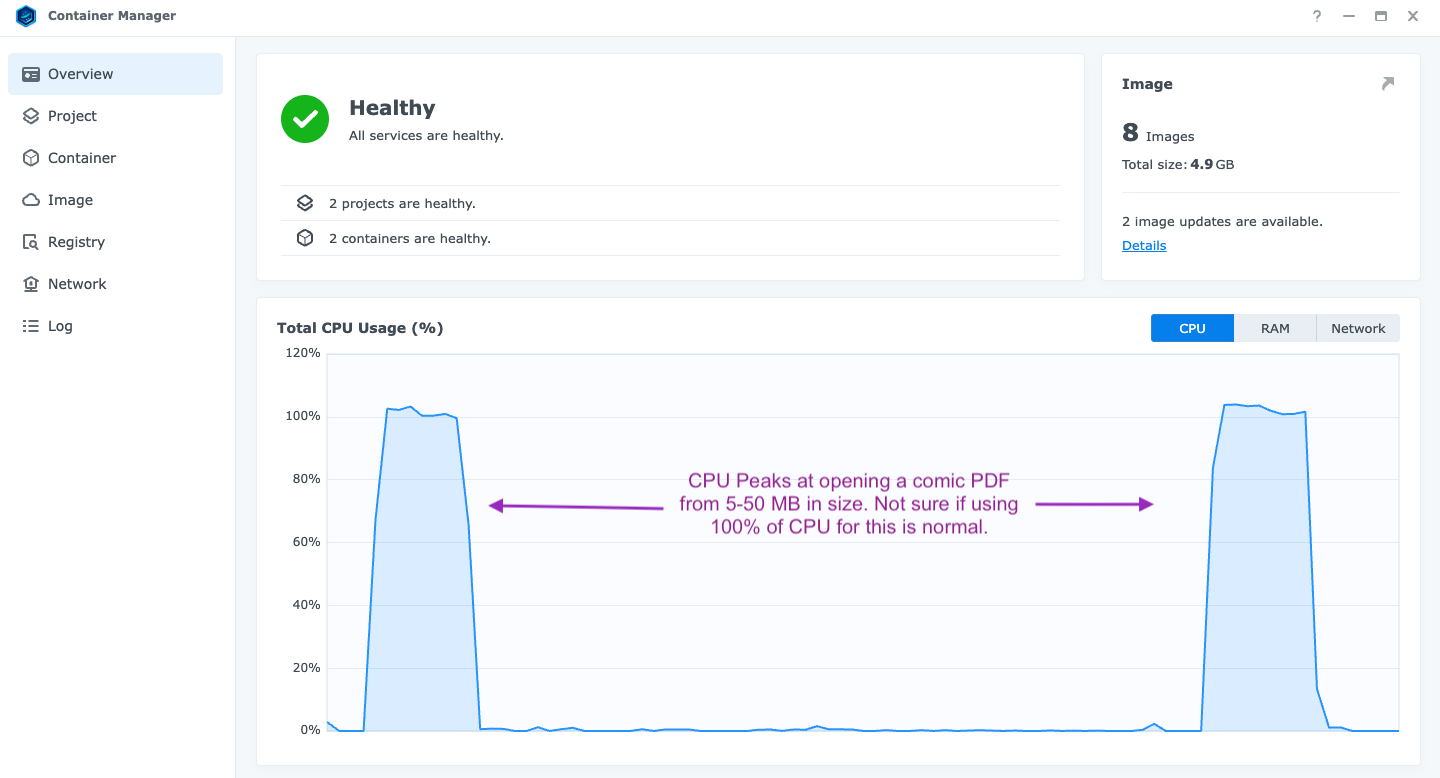
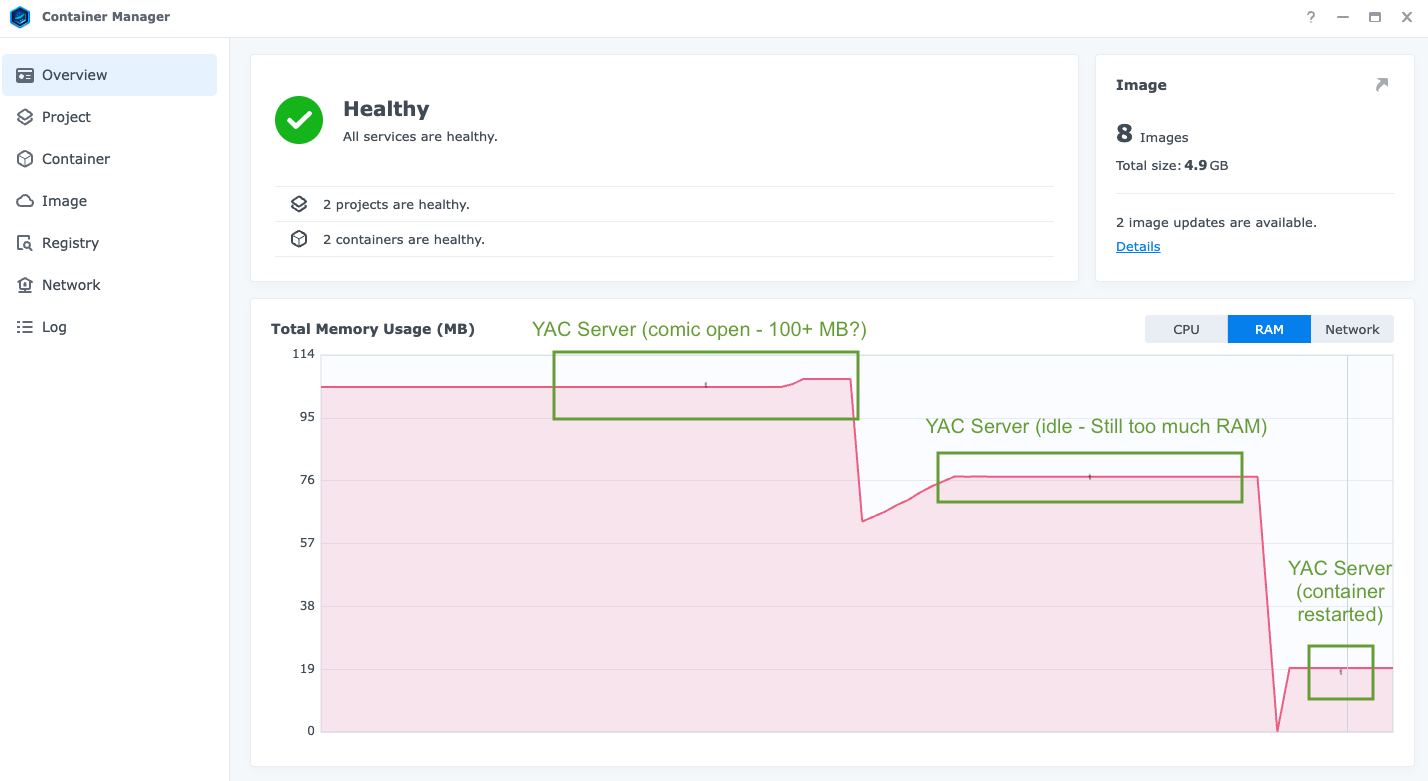
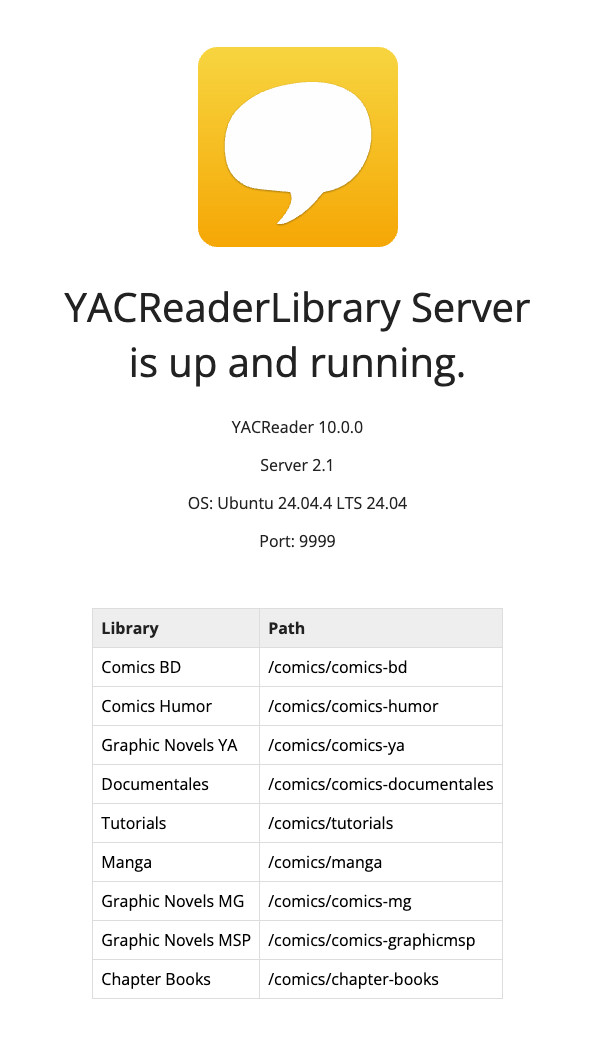
-YACreader server 10 on my Synology NAS via DSM7's Container Manager (Synology's Docker)
- YACReader client on my iPad
Over these days I noticed I had difficulties to access some server files via the iPad. The client started to load the comic file but it never ended (stuck at the loading phase). Eventually it would render a "cannot connect to YACReaderLibrary" error.
I went to check the container manager's performance indicators and noticed that when this happens the YACReader server simply hogs all available RAM and CPU resources until I restart the container, when it comes back to normal levels.
This was specially noticeable with large size files (eg: >100 MB)
I did optimize some of the largest files and made loading tests again to see if that helped. It did, but I'm still getting what I feel are too large CPU/RAM number counts for what it is essentially loading and opening files on the server side. Here are some captures (hope they render ok here)
Please Log in or Create an account to join the conversation.
- Luis Ángel
-
- Offline
- Administrator
-
Less
More
- Posts: 3354
- Thank you received: 692
3 months 2 days ago #10128
by Luis Ángel
Contribute to the project becoming a patron: www.patreon.com/yacreader
You can also donate via Pay-Pal: www.paypal.com/donate?business=5TAMNQCDD...e=Support+YACReader\
Replied by Luis Ángel on topic Synology CPU/RAM server performance issues
What files format are you using? If it’s PDF with a lot of pages the server does a lot of rendering when it opens a file.
Contribute to the project becoming a patron: www.patreon.com/yacreader
You can also donate via Pay-Pal: www.paypal.com/donate?business=5TAMNQCDD...e=Support+YACReader\
Please Log in or Create an account to join the conversation.
- alzamonart
- Offline
- New Member
-
2 months 3 weeks ago #10129
by alzamonart
Replied by alzamonart on topic Synology CPU/RAM server performance issues
I have a mix of PDF and CBR/CBZ files. I have noticed this issue happen most often with PDFs, specially large one in size/page count. Should it be better to manage those locally? (eg: file in computer/iPad storage)
Please Log in or Create an account to join the conversation.
- Luis Ángel
-
- Offline
- Administrator
-
Less
More
- Posts: 3354
- Thank you received: 692
2 months 3 weeks ago #10131
by Luis Ángel
Contribute to the project becoming a patron: www.patreon.com/yacreader
You can also donate via Pay-Pal: www.paypal.com/donate?business=5TAMNQCDD...e=Support+YACReader\
Replied by Luis Ángel on topic Synology CPU/RAM server performance issues
CBZ/CBR would have better performance, can you replace those large PDF files with CBZ?
Contribute to the project becoming a patron: www.patreon.com/yacreader
You can also donate via Pay-Pal: www.paypal.com/donate?business=5TAMNQCDD...e=Support+YACReader\
The following user(s) said Thank You: alzamonart
Please Log in or Create an account to join the conversation.
- Dj1b5
- Offline
- New Member
-
Less
More
- Posts: 5
- Thank you received: 0
2 months 2 weeks ago #10159
by Dj1b5
Replied by Dj1b5 on topic How 2 create a YACReader Server on Synology NAS
What a brilliant latest version!
I’ve finally managed to install it on my Synology!
Just one bug, on my iPad, if I go back in a comic, it doesn’t update on the server – it keeps the progress at the maximum level.
I’ve finally managed to install it on my Synology!
Just one bug, on my iPad, if I go back in a comic, it doesn’t update on the server – it keeps the progress at the maximum level.
Please Log in or Create an account to join the conversation.
- migube
- Offline
- Senior Member
-

Less
More
- Posts: 55
- Thank you received: 9
2 months 2 weeks ago #10163
by migube
Replied by migube on topic Synology CPU/RAM server performance issues
note that there are apps to do this automatically like ACBR
github.com/binarynonsense/comic-book-reader/
Please Log in or Create an account to join the conversation.
Moderators: Luis Ángel